5 Rules for Upgrading on United Airlines
-
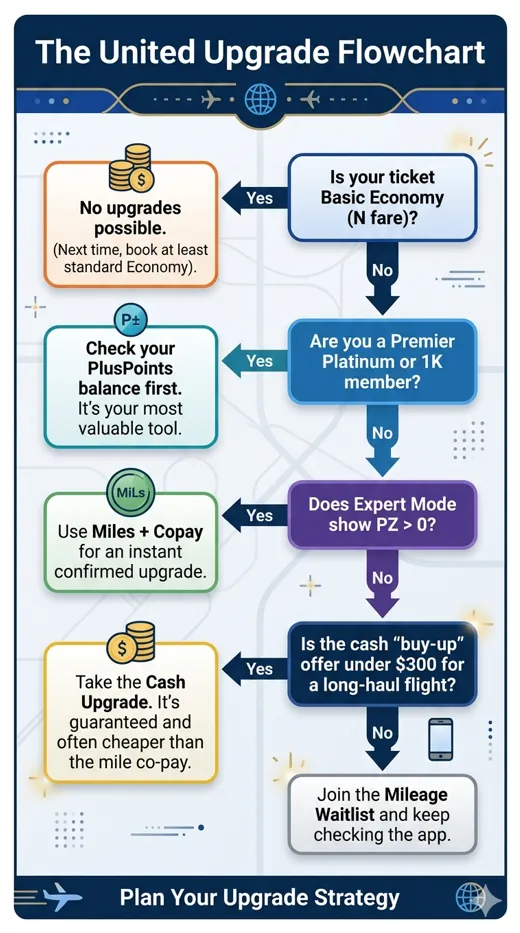
Avoid Basic Economy (N Fare): You cannot upgrade Basic Economy tickets with miles, PlusPoints, or complimentary status upgrades.
-
Check 'PZ' Inventory: Use United's "Expert Mode" to look for "PZ > 0" before booking to confirm upgrades instantly.
-
Leverage Premium Plus: Upgrading from Premium Plus (O, A, R fares) to Polaris requires fewer PlusPoints and puts you at the top of the waitlist.
-
Understand the Tie-Breakers: Status is king, but fare class (booking a 'W' fare vs 'K' fare) breaks the tie on the waitlist.
-
Hold a Co-Branded Card: Primary cardholders of Chase United credit cards receive priority over non-cardholders within the same elite tier.
Whether you are a seasoned road warrior chasing United 1K status or an occasional traveler looking to make your next long-haul flight more comfortable, understanding the United upgrade ecosystem is the key to luxury travel.
This guide is designed for:
-
Frequent United Flyers: Mastering the nuances of status-based upgrades.
-
Credit Card Points Users: Leveraging Chase and MileagePlus cards for premium seats.
-
Star Alliance Travelers: Navigating partner upgrades.
-
Business Travelers: Chasing the coveted United Polaris lie-flat experience.
Want to upgrade to United Polaris without paying full business-class fares? Here’s exactly how it works.
How United Upgrades Work: A Quick Summary
United offers several paths to a better seat. Understanding "how to upgrade on United" starts with identifying which "currency" you are using.
Before diving into upgrade strategies, it’s important to understand how these programs relate to each other. MileagePlus is United Airlines’ loyalty program where members earn miles and elite status. Those miles can be redeemed through Mileage Upgrade Awards, which let travelers upgrade eligible flights using miles (sometimes with an additional cash copay). PlusPoints is a separate upgrade currency available only to higher-tier Premier elite members, allowing them to request upgrades without spending miles.
Meanwhile, Star Alliance is the global airline alliance that includes United and partner airlines like Lufthansa and Singapore Airlines. Your MileagePlus miles can often be earned or redeemed across Star Alliance partners, but upgrade eligibility on partner airlines follows different rules than upgrades on United-operated flights.
Complimentary Premier Upgrades (CPU)
Available to MileagePlus Premier members on most domestic flights within North America, as well as flights to Central America and the Caribbean. These are "space-available" and clear automatically based on status.
Mileage Upgrade Awards
A "Miles + Copay" model. You use your hard-earned MileagePlus miles, often accompanied by a cash co-pay (ranging from $0 to $600+), to secure a seat in United First or Polaris.
PlusPoints Upgrades
The gold standard for Premier Platinum and 1K members. PlusPoints replaced the old "Regional/Global Premier Upgrades" and offer ultimate flexibility for upgrading across domestic and international routes.
Cash Upgrades
Often found under "Manage Trip," United frequently offers instant buy-ups. These prices can fluctuate wildly depending on demand.
Day-of-Departure Upgrades
Last-minute offers available during check-in or at the gate. Sometimes these are the most cost-effective way to jump into a premium cabin.
Star Alliance Partner Upgrades
Use United miles to upgrade on eligible flights operated by partners like Lufthansa, ANA, or Singapore Airlines (subject to specific fare class requirements).

United Upgrade Comparison Table
|
Upgrade Type |
Cost |
Who Qualifies |
Best For |
Success Rate |
|---|---|---|---|---|
|
CPU |
Free |
Premier Silver+ |
Short Domestic |
Low/Moderate |
|
Miles + Copay |
All Members |
International / Long-haul |
Moderate/High |
|
|
PlusPoints |
Platinum / 1K |
Business/International |
High |
|
|
Instant Cash |
Variable Cash |
Anyone |
Guaranteed Seating |
100% (Instant) |
|
Star Alliance |
Miles |
All Members |
Partner Flights |
Low (Limited space) |
Eligibility: Which Tickets Can (and Can't) Be Upgraded?
Every plane ticket has a "Fare Class" (a single letter code). This letter determines your price, your refundability, and—most importantly—your upgrade potential.
1. The "Golden Rule" of United Upgrades: Fare Classes
1.1 The "Non-Upgradable" List (Avoid These!)
If you hold one of these tickets, you are generally stuck in your assigned seat:
-
Basic Economy (Fare Class: N): This is the most restrictive category. Basic Economy tickets cannot be upgraded with Miles, PlusPoints, or CPUs. You cannot even pay for an Economy Plus seat in some cases.
-
Award Tickets (X, XN, YN): If you booked your flight entirely with miles, you generally cannot use more miles or PlusPoints to upgrade further (Exception: Premier 1K members on certain domestic routes can receive CPUs on award tickets).
-
Deep Discount/Promotional Tickets: Certain bulk fares or "unpublished" fares (often booked through obscure third-party sites) may be ineligible.
1.2. The "Upgradable" Fare Classes
-
Standard Economy: Classes like Y, B, M, H, Q, V, W, S, T, L, K, and G are all upgradable.
-
Premium Plus (O, A, R): These are the "Purple Seats." They are highly eligible for upgrades to Polaris Business Class and sit at the top of the waitlist priority.
2. Route Rules: Where Can You Upgrade?
The rules change depending on where you are flying. United categorizes its routes into two main buckets for upgrade purposes.
2.1 Domestic & Short-Haul International
-
Routes: Within the U.S., Canada, Mexico, Central America, and the Caribbean.
-
Upgrade Types: Eligible for CPUs (Complimentary Premier Upgrades), Miles, and PlusPoints.
-
Tip: These are the easiest routes to snag a better seat for free if you have Premier status.
2.2 Long-Haul International (The "Polaris" Routes)
-
Routes: Trans-oceanic flights (e.g., U.S. to Europe, Asia, Australia, South America, or Africa).
-
Upgrade Types: CPUs are NOT available. You must use Miles + Copay, PlusPoints, or Cash.
-
The "Premium Plus" Hack: If you fly a route with a "United Premium Plus" cabin, upgrading from Economy to Premium Plus is often easier and cheaper than jumping straight to Polaris.
2.3 Special Cases: "Premium Transcontinental"
Flights between New York/Newark (EWR) and Los Angeles (LAX) or San Francisco (SFO) are treated like international flights. They feature lie-flat seats, and consequently, CPUs are not allowed. You must use instruments (Miles/PlusPoints) to upgrade.
3. Can I Upgrade on Partner Airlines (Star Alliance)?
Yes, but the rules are much stricter.
-
Eligible Partners: Lufthansa, All Nippon Airways (ANA), Air Canada, Singapore Airlines, etc.
-
The Catch: You can only use Miles to upgrade on specific, expensive fare classes (usually Y, B, or O).
-
Process: You must request this through the "Star Alliance Upgrade" portal on United’s website, not through the standard app.
4. Quick Checklist: Is My Flight Upgradable?
-
Check your fare class: Is it "N" (Basic Economy)? If yes -> No.
-
Check your route: Is it a 10-hour flight to Tokyo? If yes -> Need Miles or PlusPoints (No CPUs).
-
Check your currency: Do you have enough miles or PlusPoints? If yes -> Proceed to Request.
Pro Editor's Tip: Always check the "Fare Rules" before clicking "Buy" if your goal is an upgrade. A $50 difference between a K fare and a W fare could mean the difference between sitting in 42B or 2A.
United Upgrade Priority Order Explained
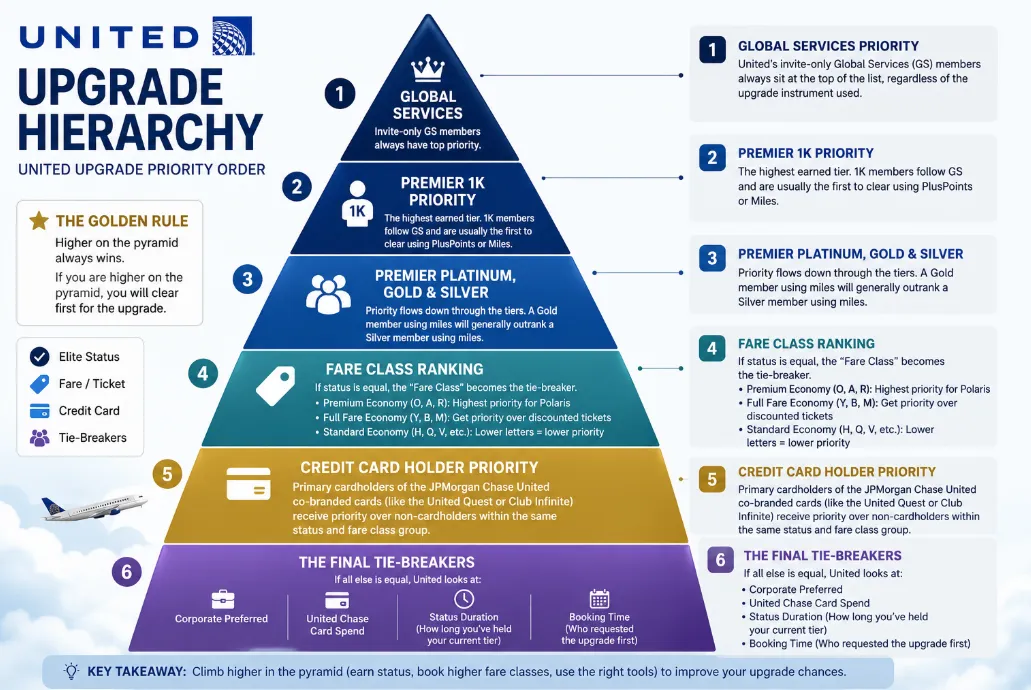
Understanding the "United upgrade list" is like deciphering a secret code. When multiple people want the last seat, United follows a strict hierarchy.
1. Global Services Priority
United's invite-only Global Services (GS) members always sit at the top of the list, regardless of the upgrade instrument used.
2. Premier 1K Priority
The highest earned tier. 1K members follow GS and are usually the first to clear using PlusPoints or Miles.
3. Premier Platinum, Gold, and Silver
Priority flows down through the tiers. A Gold member using miles will generally outrank a Silver member using miles.
4. Fare Class Ranking
If status is equal, the "Fare Class" becomes the tie-breaker. United ranks tickets based on their original price and flexibility:
-
Premium Economy (O, A, R): Travelers in United Premium Plus (Purple Seats) have the highest priority for Polaris.
-
Full Fare Economy (Y, B, M): These expensive tickets get priority over discounted ones.
-
Standard Economy (H, Q, V, etc.): The lower the letter in the alphabet, the lower the priority.
5. Credit Card Holder Priority
Primary cardholders of the JPMorgan Chase United co-branded cards (like the United Quest or Club Infinite) receive priority over non-cardholders within the same status and fare class group.
6. The Final Tie-Breakers
If all else is equal, United looks at:
-
Corporate Preferred: Travelers on corporate accounts.
-
United Chase Card Spend: Total spend on co-branded cards.
-
Status Duration: How long you've held your current tier.
-
Booking Time: Who requested the upgrade first.
United Upgrade Waitlist Explained
The waitlist is a real-time, dynamic list of all passengers competing for the remaining premium seats. In 2026, United has increased transparency, but the competition remains fierce on high-traffic routes like SFO-EWR or LAX-LHR.
What Is the Upgrade Waitlist?
The waitlist is essentially a "holding pen" for upgrade requests. When you apply Miles, PlusPoints, or are eligible for a CPU, and the specific upgrade inventory (PZ for Polaris/First or PN for Global Services/1K) is not available, United places you on this list. Your position is determined by the priority hierarchy we covered in previous chapter.
Why Your Upgrade Didn’t Clear Instantly
It’s a common frustration: "The seat map shows 10 empty seats in Business, so why am I waitlisted?"
-
Inventory Control: United uses sophisticated AI to predict if they can still sell those 10 seats for cash. They won't release them for upgrades until they are sure no one will buy them.
-
PZ vs. J: The seat map shows "J" (physical seats), but upgrades only clear when "PZ" (upgrade-specific buckets) are opened by the revenue management team.
When United Clears Upgrades
Upgrades don’t clear all at once. They happen in distinct "waves":
-
Immediately after booking: If PZ space is available, you skip the waitlist entirely.
-
The "Advance" Window (96 to 24 hours out): This is when CPUs (Complimentary Upgrades) for elites begin to sweep. 1K members might clear at 96 hours, while Silvers wait until the day of departure.
-
The 24-Hour Window: When check-in opens, the list often reshuffles as passengers confirm their attendance.
-
At the Gate (T-60 to T-15 minutes): The final clearing of seats usually happens 15–30 minutes before boarding. The gate agent will process the remaining waitlist until the cabin is full.
What Happens at the Gate
Once the flight is under "Airport Control" (usually 2–3 hours before departure), the gate agent is the final authority.
-
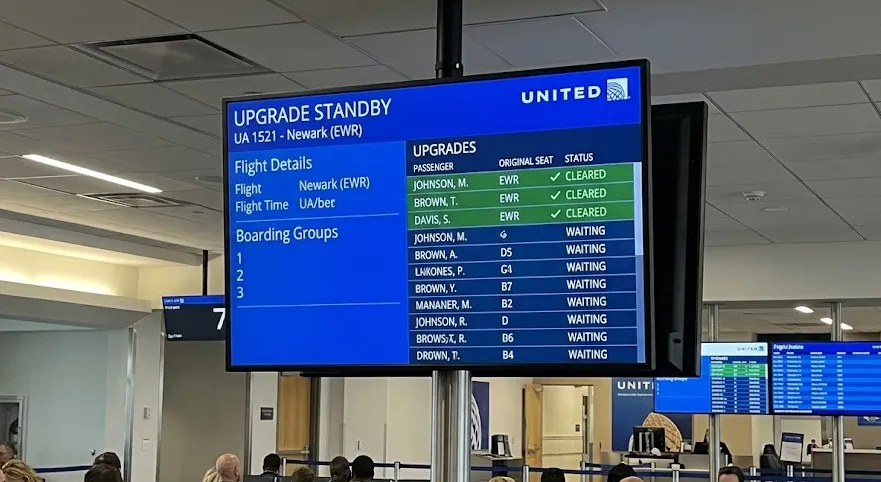
The Standby List: You will see your name on the gate screens (usually as the first three letters of your last name and your first initial).
-
Last-Minute No-Shows: If a confirmed Business traveler misses their connection, that seat goes to #1 on the upgrade waitlist at the very last second—sometimes even after you've boarded your Economy seat.
What Happens If Your Upgrade Doesn’t Clear
The "failed upgrade" is a part of the game. Here is how United handles your "currency":
-
Mileage Upgrade Awards: If you don't clear the waitlist for your requested cabin, United will automatically refund both the Miles and the Cash Copay.
-
PlusPoints: These are redeposited into your MileagePlus account immediately after the flight departs.
-
The "Glitch" Check: While refunds are usually automatic (within 7–10 days), experienced flyers recommend checking your credit card statement. If the copay isn't refunded, you may need to submit a request at
united.com/refunds.
Pro Editor's Tip: If you are flying a multi-segment trip (e.g., Singapore to SFO to Denver) and only the short domestic leg clears, United generally considers the "Upgrade Award" as "used." However, if the long-haul "Polaris" leg doesn't clear, you are typically eligible for a refund of the difference.
How to Check Your Position on the United Upgrade List
In 2026, you no longer have to wait until check-in to see where you stand. Here are the most effective ways to check the United upgrade list.
Using the United Airlines App
The United upgrade list app interface is the most powerful tool for travelers.
-
30-Day Preview: Under "My Trips," you can now see a "Beta" version of the upgrade list up to 30 days before departure. This helps you gauge your competition early.
-
Flight Status Method: * Tap "Flight Status" at the bottom of the app.
-
Enter your flight number and date.
-
Tap the "Upgrades" tab. This shows the "Capacity," "Booked," and "Checked-in" numbers, plus the full waitlist.
-
Pro Tip: Enabling "Expert Mode" for Deep Insights
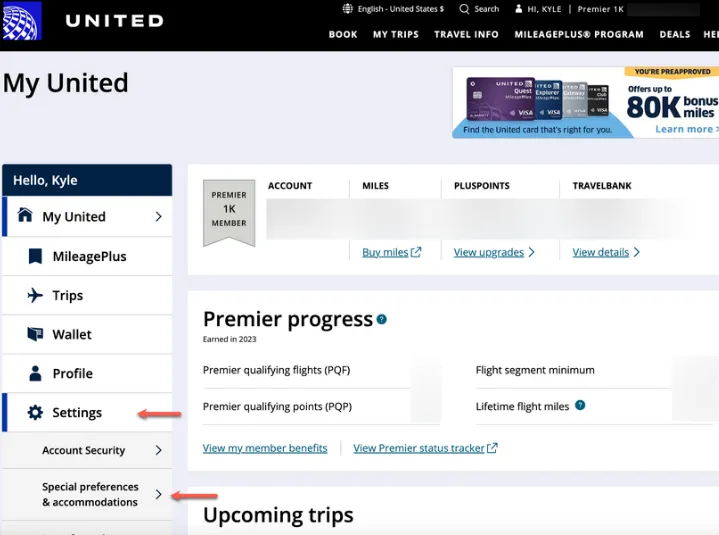
For serious flyers, simply seeing your rank isn't enough. You want to see the inventory. By enabling Expert Mode on your United profile (under Preferences -> Display Preferences on United.com), you can see the exact number of upgrade seats available.
-
How to use it: When searching for flights or viewing your flight details, click "Fare Class" to see a string of letters like
J9 JN9 C9 D9 ... PZ3. -
The Secret Code:
- PZ > 0: This means an upgrade is available for immediate clearing with Miles or PlusPoints.
-
PN > 0: This means an upgrade is available for Global Services or 1K members (on certain fares).
-
Why it matters: If you are #1 on the waitlist and see
PZ0, you won't clear yet. If you seePZ2, the system is about to sweep, and you're likely getting that seat.
Using United.com
If you prefer a larger screen, United Airlines provides the same data via their website:
-
Go to the "Flight Status" page on United.com.
-
Search for your flight.
-
Click on "Upgrade Standby List". This view is often the most detailed, showing exactly how many seats are "Available" (in green) vs. "Full" (in red).
Checking at the Airport
Once you arrive at the terminal, the digital displays at the gate become the "source of truth."
-
GIDS (Gate Information Display Screens): These screens cycle through the "Standby List" and the "Upgrade List."
-
Privacy: Names are truncated (e.g., "SMI, J.") to protect your identity.
Talking to Gate Agents
While you can talk to a gate agent, keep in mind:
-
The System is Automated: Gate agents rarely "skip" the list manually unless there is a severe operational issue.
-
When to Inquire: Only approach them if you see a seat assigned to someone below you on the list, or if the cabin shows "Available" but no names are clearing.
How to Read Your Upgrade Rank
Your rank isn't just a number; it's a reflection of your status.
-
Rank #1-3: Excellent chance, especially on narrow-body domestic flights.
-
Rank #10+ on a Polaris Flight: Highly unlikely to clear unless there's a massive weather delay causing misconnections.
-
The Check-in Reshuffle: Don't panic if you are #2 today and #5 tomorrow. This usually means a higher-tier elite (like a 1K) just checked in.
What Happens If Your Upgrade Doesn’t Clear
If you reach the "Gate" phase and the plane doors close without you in the premium cabin:
-
Refunds / Miles Redeposit: United will automatically refund your Miles and Copay or redeposit your PlusPoints within 72 hours.
-
Pro Tip: If you aren't refunded within a week, visit
united.com/refundswith your ticket number.
Decoding United's Upgrade Inventory Codes:
-
J, C, D, Z, P: These represent physical business class seats available for cash purchase. Do not confuse these with upgrade availability.
-
PN: Upgrade inventory exclusively for Global Services and Premier 1K members (on specific Y, B, M fares).
-
PZ: The holy grail. This is the general upgrade inventory for all members using Miles or PlusPoints. If
PZ > 0, your upgrade will clear instantly upon request.
How to Upgrade to United Polaris: The Ultimate Strategy
United Polaris is one of the most coveted business-class experiences in the sky. However, scoring a $5,000 seat for a fraction of the price requires a mix of the right "currency," timing, and the use of Expert Mode.
1. The Polaris Upgrade Hierarchy: PlusPoints vs. Miles
To get into Polaris, you need more than just status; you need an "instrument."
1.1 Using PlusPoints (The Premier 1K/Platinum Secret)
PlusPoints are the most flexible tool in the United ecosystem.
-
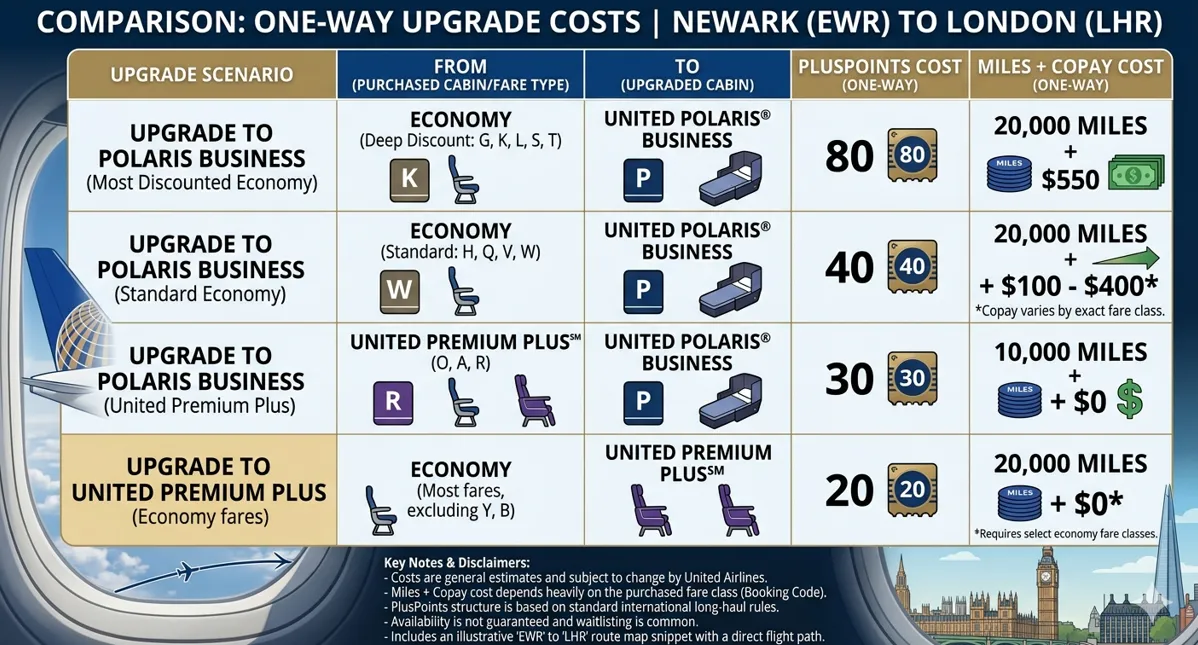
From Economy to Polaris: Usually costs 40 PlusPoints.
-
From Premium Plus (O, A, R) to Polaris: Costs only 10–20 PlusPoints.
-
The "Skip the Waitlist" Feature: On certain high-demand routes, 1K members can spend extra PlusPoints to confirm a Polaris seat instantly, even if PZ inventory is zero (subject to availability).
1.2 Using Mileage Upgrade Awards (Miles + Copay)
For those without high elite status, this is the most common path.
-
The Cost: Typically 15k–35k miles + a cash copay ($300–$600) for a one-way long-haul flight.
-
The "W" Fare Strategy: If you book at least a W fare class or higher, your mileage request is prioritized over discounted S, T, or K fares.
2. Mastering Expert Mode to Score Polaris
Don't request an upgrade blindly. Use Expert Mode (as discussed in "How to Check Your Position on the United Upgrade List" Chapter) to find the "Sweet Spots."
2.1 Hunting for PZ Inventory
When searching for flights on United.com with Expert Mode enabled:
-
Look for the PZ code.
-
PZ > 0: This is the "Holy Grail." You can apply PlusPoints or Miles and clear into Polaris instantly at the moment of booking.
-
PZ = 0 but J > 5: If there are no upgrade seats but the business cabin (J) is still empty, your chances of clearing the waitlist 24 hours before flight are high.
2.2 The "Premium Plus" Lever (The R/A/O Hack)
If you want Polaris, don't book standard Economy. Book United Premium Plus (Fare classes O, A, or R).
-
Why it works: Passengers in the Premium Plus cabin are always prioritized for Polaris upgrades over everyone in the Economy cabin, regardless of status.
-
Scenario: A Premier Silver member in Premium Plus will likely beat a Premier 1K member in Economy for the last Polaris seat.
3. Step-by-Step: How to Request Your Polaris Upgrade
-
Enable Expert Mode in your United profile settings.
-
Search for Flights: Look for routes with
PZavailability for instant gratification. -
Check Fare Class: Ensure you aren't booking Basic Economy (N).
-
Apply Instrument: After booking, go to "Manage Trip" -> "Upgrade Cabin."
-
Choose Your Strategy: * Apply PlusPoints if you have them.
-
Use Miles + Copay if you don't.
-
-
Monitor the Waitlist: Use the 30-day preview in the United upgrade list app to track your rank.
4. Common Polaris Upgrade Traps
-
Thinking the "Buy Up" Price is Final: The instant cash offer in the app changes hourly. Sometimes it’s cheaper to wait until check-in.
-
Ignoring the "Equipment Swap": If United changes the aircraft from a 777-300ER (with Polaris) to an older 767, the number of available seats might drop, pushing you down the list.
-
Waitlisting for "Polaris" on Domestic Flights: Remember, "United First" on a domestic flight is NOT Polaris. Don't waste 40 PlusPoints on a 2-hour flight unless it's a designated Premium Transcontinental route.

Best Ways to Improve Your Upgrade Chances
Understanding the rules is step one. Step two is learning how to "game" the system. Even if you aren't a Global Services member, these strategies will significantly move you up the waitlist.
Choose Better Fare Classes (The "W" Rule)
In the United world, the letter on your ticket matters almost as much as your status.
-
Avoid "Bottom-Tier" Economy: Fare classes like S, T, L, K, and G are the most common but have the lowest upgrade priority.
-
The "W" Sweet Spot: For long-haul Polaris upgrades using Miles or PlusPoints, booking a W fare or higher is a classic strategy. It’s often only $50–$100 more than the cheapest economy ticket but puts you ahead of thousands of other travelers in the priority tie-breaker.
Fly Less Competitive Routes (The "Hub-to-Hub" Trap)
If you fly SFO to EWR (San Francisco to Newark) on a Monday morning, you are competing with 50+ Global Services and 1K members. Your chances of a CPU are nearly zero.
-
Try "Spoke" Routes: Upgrades are much easier on flights between a hub and a non-hub city (e.g., Denver to Columbus or Houston to Omaha).
-
New 2026 International Routes: Look for United's newer or seasonal destinations like Split (Croatia) or Bari (Italy). These secondary European markets often have better upgrade availability than "business heavy" routes like London or Frankfurt.
Avoid Peak Travel Days
The "Business Travel Cycle" is your biggest enemy.
-
The "No-Go" Times: Monday mornings and Thursday/Friday afternoons are when elite road warriors clog the waitlist.
-
The "Gold Mine" Times: Tuesday, Wednesday, and Saturday. Business travel drops significantly on these days, leaving more Polaris and First Class seats for leisure upgraders.
-
Holiday Trick: Flying on the actual holiday (e.g., Christmas Day or Thanksgiving Day) is one of the best ways to score an upgrade as a Silver or Gold member.
Use PlusPoints Strategically (The "Premium Plus" Lever)
As mentioned in the Polaris chapter, the smartest way to use PlusPoints is to buy into Premium Plus (O, A, R) with cash first.
-
Why? You jump to the very top of the Polaris waitlist, ahead of every single person seated in Economy (including 1Ks in Y/B fares).
-
Efficiency: It costs fewer PlusPoints to go from Premium Plus to Polaris than from Economy to Polaris.
Monitor Inventory Frequently (The 24-Hour Rule)
Upgrades are dynamic. A seat might open up because of a cancellation or a missed connection.
-
Check at T-24: The moment check-in opens, many "held" seats are released.
-
The "Expert Mode" Refresh: Keep checking for PZ > 0. If you see it, and your waitlist hasn't cleared, call United immediately. Sometimes the automated system lags, and a phone agent can "force" the upgrade manually if the space is visible.
Book Earlier
While booking time is a low-level tie-breaker, it does matter when two people with the same status and fare class are competing for the last seat.
-
The "Timestamp" Factor: Your position on the waitlist is partially determined by when you requested the upgrade. If you know you want to upgrade, don't wait—submit the request the second you finish booking the ticket.
Common United Upgrade Mistakes to Avoid
Even seasoned pros make mistakes. If your United upgrade failed, it was likely due to one of these common pitfalls:
Booking Basic Economy (N Fare)
We cannot stress this enough: Basic Economy is an upgrade dead-end. You cannot use Miles, PlusPoints, or get a CPU. If you see an "N" fare, and you want a better seat, don't book it.
Ignoring Fare Classes
Many travelers book the "cheapest available" and wonder why they are #45 on the list. A tiny investment in a higher fare class (like V or W) can move you from #45 to #5.
Misunderstanding Waitlists
Just because there are 5 empty seats on the seat map doesn't mean those seats are available for upgrades. Remember: Seat Map ≠ Upgrade Inventory. Always look for PZ in Expert Mode.
Wasting PlusPoints on "Short Hops"
Don't use 20 PlusPoints for a 45-minute flight from Chicago to Indianapolis. Save that "currency" for long-haul flights where a lie-flat bed actually impacts your health and productivity.
Waiting Too Long
If you see a cash upgrade offer for $200 on a 5-hour flight, take it. Waiting for a "free" CPU as a Gold or Silver member is a gamble that rarely pays off in today's high-load environment.
United vs. Delta vs. American Airlines Upgrade Policies
When choosing a primary airline, the "ease of upgrade" is often the deciding factor for frequent flyers. In 2026, the gap between the "Big Three" has widened. Here is how United stacks up against Delta Air Lines and American Airlines.
Which Airline Has the Easiest Upgrades
United Airlines: The "Transparency" Leader
United wins on transparency and tools. With the integration of "Expert Mode" and the "30-Day Waitlist Preview," United travelers have the best data to decide whether to spend miles or wait for a CPU.
-
The Edge: PlusPoints. No other airline offers a currency as flexible as PlusPoints for confirming upgrades months in advance.
Delta Air Lines: The "Paid Upgrade" King
Delta has moved toward a "Premium Retail" model. They are the best at selling seats that used to be given away for free.
-
The Catch: Delta's "SkyMiles" are often valued lower than United miles. Upgrading with miles on Delta (especially for international routes) often requires an astronomical amount of points.
-
The Edge: Delta's Medallion Complimentary Upgrades are arguably the most reliable for domestic flights if you hold Diamond status, but the "Upgrade Certificates" for international flights are much harder to use than United’s PlusPoints.
American Airlines: The "Loyalty Point" Gambler
American Airlines (AA) ranks its upgrade list based on Loyalty Points earned in the last 12 months.
-
The Catch: On AA, your status isn't just about how much you fly; it's about how much you spend on their credit cards and shopping portal.
-
The Edge: AA allows Complimentary Upgrades on all domestic flights for ALL elite levels, including the lowest tier (Gold). On United, Silver members are often buried so deep on the list that this "perk" rarely manifests.
Which Airline Has Better Elite Perks?
|
Feature |
United Airlines |
Delta Air Lines |
American Airlines |
|---|---|---|---|
|
Top Tier |
Premier 1K / Global Services |
Diamond / 360 |
Executive Platinum / CK |
|
Upgrade Currency |
Global/Regional Certs |
Systemwide Upgrades |
|
|
Domestic CPUs |
For all Elite tiers |
For all Elite tiers |
For all Elite tiers |
|
Companion Upgrades |
Yes (1 companion) |
Yes (1 companion) |
Yes (1 companion) |
|
Award Ticket CPUs |
For 1K members only |
For all Elite tiers |
For all Elite tiers |
Editorial Note: In 2026, American and Delta both offer complimentary upgrades on award tickets for all elites, while United still restricts this mostly to 1K members on domestic routes. This makes United slightly less friendly for those who fly primarily on points.
Which Airline Has Better International Upgrade Options?
For long-haul travel (The "Polaris" vs. "Delta One" vs. "Flagship Business" battle), the mechanics differ significantly.
The United Advantage (Polaris)
United is the only carrier that allows you to instantly confirm an international upgrade at the time of booking if PZ space is open. You don't have to wait for a "clearance window."
-
Verdict: Best for travelers who want certainty and know how to use Expert Mode.
The Delta Advantage (Delta One)
Delta’s Global Upgrade Certificates (GUCs) allow Diamond members to leapfrog into the next cabin. If you buy Economy, you can clear into Premium Select instantly, and then waitlist for Delta One.
-
Verdict: Best for travelers who prioritize the "on-board service" and "Sky Club" experience, provided they can find the elusive certificate availability.
The American Advantage (Flagship Business)
American's Systemwide Upgrades (SWUs) are powerful but limited in number. However, American's "Business Plus" fares sometimes offer a more direct path to upgrades for mid-tier elites.
-
Verdict: Best for "big spenders" who earn millions of Loyalty Points through non-flying activities.
Final Verdict: Which One Should You Choose?
-
Choose United if: You value control and data. You are willing to learn "Expert Mode" to find the exact flights that will clear. PlusPoints are the most valuable "points" in the industry for business travelers.
-
Choose Delta if: You want the most consistent "luxury" experience and don't mind paying a bit more in miles or cash for it.
-
Choose American if: You do a lot of online shopping or credit card spending. You can reach the top of the upgrade list without ever stepping on a plane.
Pro Editor's Tip: In 2026, the "best" airline is the one that has a hub in your home city. No amount of PlusPoints can make up for a 3-hour connection when you could have flown non-stop.
Best Credit Cards for United Upgrades (2026)
In 2026, the right card is a strategic tool to generate miles and bypass tie-breakers on the upgrade list.
The "Tie-Breaker" Advantage
This is the hidden secret of the United upgrade list. If you and another passenger have the same Premier status and the same Fare Class, United uses primary cardholder status of a Chase United credit card as the tie-breaker. Holding a co-branded card ensures you stay ahead of non-cardholders in your tier.
Top Card Picks for Upgraders
|
Card |
Best For |
Key Upgrade Perk |
|---|---|---|
|
Luxury / 1K Seekers |
Highest PQP earning potential + Club access. |
|
|
Frequent Upgraders |
$125 annual United credit + 10k mile rebate. |
|
|
Occasional Flyers |
Tie-breaker status + Expanded award seat access. |
|
|
Points Flexibility |
1:1 instant transfer to United; 3x points on travel. |
2026 Strategy: Earning PlusPoints via Credit Card Spend
In 2026, you can earn Premier Qualifying Points (PQP) through credit card spend to reach higher status levels (Platinum or 1K) which grant you PlusPoints.
-
The Math: You earn 25 PQP for every $500 spent on eligible United cards.
-
The Goal: If you are a high spender, you can "spend your way" to a higher status tier, effectively buying the PlusPoints you need for international Polaris upgrades.
FAQ: Frequently Asked Questions About United Upgrades
Q1: Why didn’t my United upgrade clear even though there were empty seats?
A: This is the most common frustration. United upgrade inventory (PZ class) is different from physical seat availability. United’s revenue management often holds seats until the last minute, hoping to sell them for cash rather than clearing the waitlist. Always check Expert Mode for "PZ" values rather than just the seat map.
Q2: Can I upgrade a United Basic Economy ticket with miles or PlusPoints?
A: Unfortunately, no. United Basic Economy upgrade eligibility is non-existent. Fare class "N" is strictly excluded from all upgrade types, including CPUs, Miles, and PlusPoints. If you want a better seat, you must book at least a standard Economy (G, K, L, etc.) fare.
Q3: Is it worth using a United mileage upgrade award on long-haul flights?
A: Yes, especially for United Polaris upgrade cost efficiency. Using 20,000–30,000 miles plus a co-pay is often significantly cheaper than paying the full business class fare. However, ensure you are booked in a higher fare class (like W) to improve your rank on the waitlist.
Q4: Can someone else use their PlusPoints to upgrade my flight?
A: Absolutely. A Premier Platinum or 1K member can apply their United PlusPoints for others even if they are not traveling on the same itinerary. They simply need your confirmation number and last name to "sponsor" your upgrade request from their own account.
Q5: Do United upgrades clear at the gate or before I arrive at the airport?
A: It depends on inventory. While some clear weeks in advance (if PZ > 0), many United gate upgrades only process 15–60 minutes before boarding. If the cabin isn't full, the gate agent will clear the waitlist in priority order until every premium seat is filled.
Q6: Can I get a refund if my United upgrade doesn't clear?
A: Yes. If you requested a United mileage upgrade refund and your request was not honored, United will automatically redeposit your miles and refund the cash co-pay. This typically happens within 7–10 days after your flight departs, but you can request a manual refund if it doesn't process automatically.
Final Verdict: Which Card Should You Carry?
-
For Priority on the List: The United Quest Card offers the best balance of annual fee and upgrade-specific perks.
-
For Earning Miles Fast: The Chase Sapphire Reserve (3x on all travel) remains the king of earning speed.
-
For Small Businesses: The United Business Card allows you to keep business spend separate while still benefiting from the "Tie-Breaker" rule.
Pro Editor's Tip: Always use your United card to pay the Cash Copay on mileage upgrades. This ensures that your upgraded itinerary is covered by the card's travel insurance (Trip Delay/Cancellation) based on the new, higher-value class of service.
Related Guide: Ultimate Guide to Baggage Policies of the 9 Major U.S. Airlines; Pet Travel Guide in USA; How to Book Cheap Domestic Flights in the USA