So, you’ve got your keys, your playlist is ready, and you're hitting the American roads. Everything is great until you arrive at your destination and see a pole with three different signs, two colors on the curb, and a mysterious digital meter. Welcome to the world of U.S. parking!
Whether you are a tourist on a road trip, an international student, or a new resident, parking in the U.S. can feel like a logic puzzle designed to make you fail. In cities like New York, San Francisco, or Chicago, "hidden traps" aren't just a myth—they're a major source of city revenue. This guide is your ultimate cheat sheet for 2026 to help you park like a pro, save money, and avoid that dreaded "orange envelope" on your windshield.
Chapter 1. How Parking Works in the United States
Before we dive into the details, let's look at the big picture.
Common Parking Types at a Glance
-
Street Parking: The most common and often cheapest option. You park alongside the curb. Rules are strictly enforced by city "meter maids."
-
Public Lots / Garages: Typically owned by the city or local government. They are usually more affordable than private options and found near civic centers or public parks.
-
Private Lots: Owned by commercial companies (e.g., SP+, LAZ). These are often more expensive but located in high-demand areas like business districts or near stadiums.
-
Valet Parking: Common at hotels, high-end restaurants, and hospitals. You leave your keys with an attendant who parks the car for you. Tipping is expected.
Street Parking vs. Off-Street Parking
-
Street Parking: Parking right on the side of the road. It’s often cheaper (or free), but comes with the most rules and risk of tickets.
-
Off-Street Parking: Think parking lots (open-air) and garages (multilevel structures). These are usually safer and easier but more expensive.
Paid Parking vs. Free Parking
In rural areas and suburbs, parking is almost always free. However, in any "Downtown" area or near major attractions, expect to pay.
2026 update: Fewer cities are accepting coins; digital is king.
Why Rules Vary by City and State
The U.S. doesn't have one national parking law. Each city (and sometimes even different neighborhoods) sets its own rules. A "legal" spot in Los Angeles might be a "towed" spot in Seattle.
The Golden Rule: Always look for a sign. If there are no signs, look further down the block. If you still don't see one, check the curb color.
Chapter 2. Step-by-Step Guide to Parking in the U.S.
How to Read Parking Signs and Avoid Costly Tickets in the U.S.
Street parking in the U.S. can be confusing—even for experienced drivers. Multiple signs on one pole, different time limits, curb colors, and city-specific rules often make drivers unsure whether they can park or not.
This section explains how to read U.S. parking signs step by step, using clear examples and visuals, so you can confidently decide:
-
Can you park here?
-
How long can you stay?
-
Do you need to pay?
How to read them:
-
Check the arrow direction (left, right, or both)
-
Check the time and day
-
Follow the most restrictive rule first
💡 Pro Tip:
If two rules overlap, the stricter rule always wins.
Step 1: Can You Park Here at All? (The Red Rule)
Before checking prices, identify the "Red Signs" or "Red Zones." If these apply, drive away immediately.
-
Understand the "Big Three" Prohibitions:
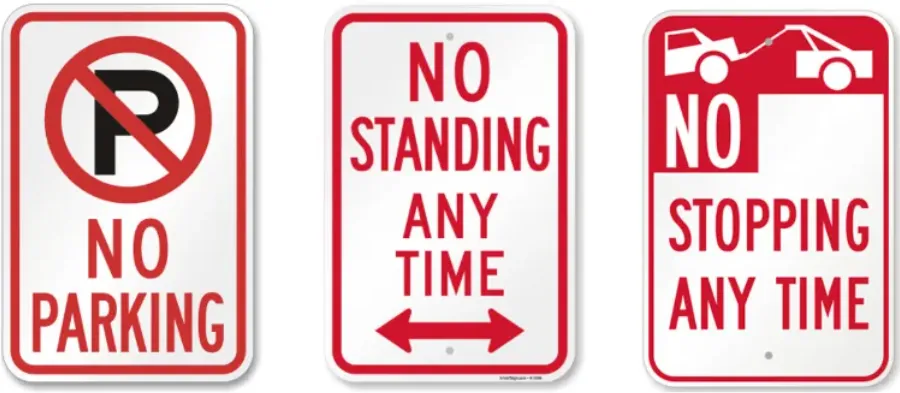 Image from https://www.myparkingsign.com/, Copyright by original author
-
No Stopping: The strictest rule. You cannot even pull over to let someone out.
-
No Standing: You can drop off or pick up passengers, but you cannot wait or unload your trunk.
-
No Parking: You can stay for a few minutes to unload goods or people, but the driver must usually stay near the vehicle.
-
-
Physical No-Go Zones: Even without a sign, these are illegal:
-
Fire Hydrants: You must stay 15 feet (approx. 4.5 meters/one car length) away.
-
Driveways: Blocking even a few inches of the sloped part of a driveway is a towable offense.
-
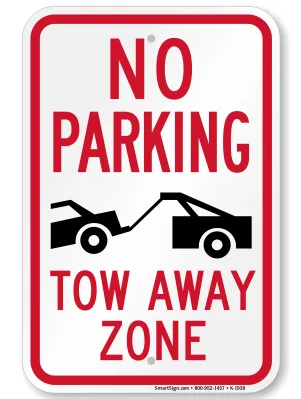
👆Parking is strictly prohibited during the posted times. Vehicles may be towed immediately, not just ticketed.
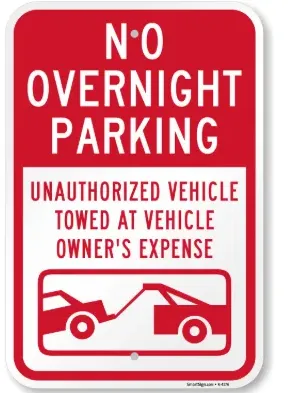
👆No overnight parking here, otherwise any unauthorized vehicle which parked here will be towed.
Step 2: Read the Sign's "DNA" (Time & Arrows)
If Step 1 is clear, look at the closest sign pole. American parking signs follow a specific logic:
-
Directional Arrows: An arrow points to the area where the rule applies.
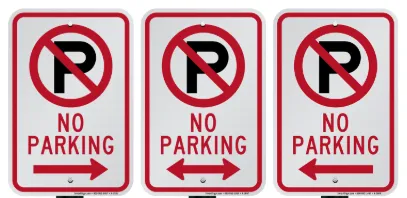 Image from https://www.myparkingsign.com/, Copyright by original author
-
Single Arrow: The rule starts (or ends) at this pole.
-
Double Arrow: The rule applies to the entire block in both directions.
-
-
Time Windows:
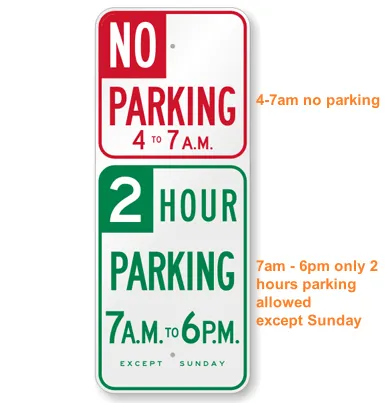 Image from https://www.myparkingsign.com/, Copyright by original authorRules often only apply during specific hours (e.g., "8 AM - 6 PM"). Outside these hours, the rule usually expires, and parking might be free or unlimited (but always check for Step 5!).
 -
Days of the Week: "Mon-Fri" means the rule doesn't apply on weekends. "Daily" means every day.
Step 3: Conditional Parking (Green & White Signs)
These signs tell you under what conditions you can park.
-
Time-Limited Parking:
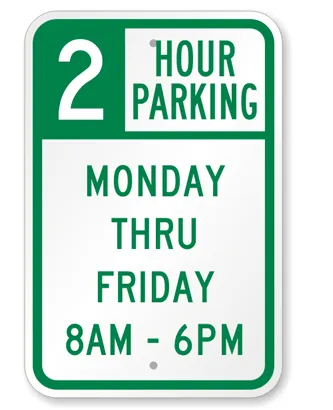 Image from https://www.myparkingsign.com/, Copyright by original authorLook for signs like "2 HR PARKING." This means you can stay for 2 hours, but then you must move your car to a different block.
 -
Permit Parking: Signs saying "Except District 4 Permits" or "Permit Required" mean the spot is reserved for local residents. Without a sticker, you will be ticketed within minutes.
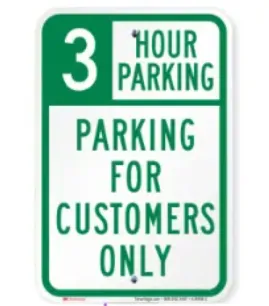 Image from https://www.myparkingsign.com/, Copyright by original author👆 Only customers are allowed to park, 3 hours.
Step 4: The Showdown (When Red and Green Meet)
In busy cities, you will often see a Red sign and a Green sign on the same pole. How do you decide?
-
The Conflict Logic: The most restrictive rule (Red) always wins.
-
Example Scenario:
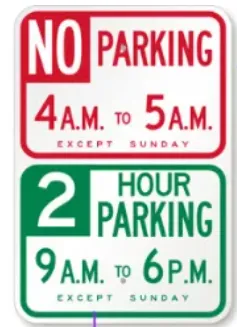 Image from https://www.myparkingsign.com/, Copyright by original author
-
Top Sign (Red): "No Parking 4 AM - 5PM"
-
Bottom Sign (Green): "2 Hour Parking 9 AM - 6 PM"
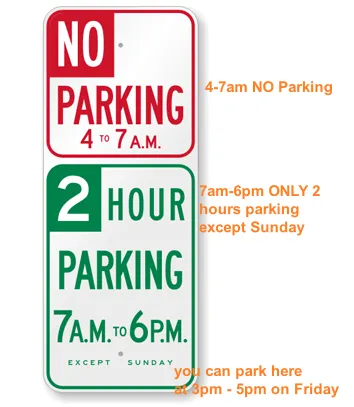 Image from https://www.myparkingsign.com/, Copyright by original author
-
-
The Verdict: If it is 4:30 PM, you cannot park there, even though the green sign says you have time left. The "No Parking" window overrides the permission.
Step 5: Beware of the "Hidden Traps"
These are the silent killers of your bank account. Always scan for these before walking away:
-
Street Cleaning (Street Sweeping):
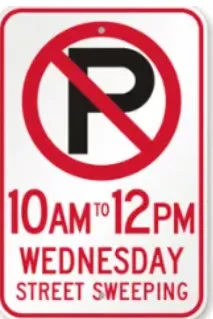 Image from https://www.myparkingsign.com/, Copyright by original authorLook for small signs prohibiting parking for a 2-hour window once or twice a week (e.g., "Every Wednesday").
-
Pro Tip: Even if the sweeper has already passed, the ticket is still valid until the time window expires.
-
-
Disabled (ADA) Parking:
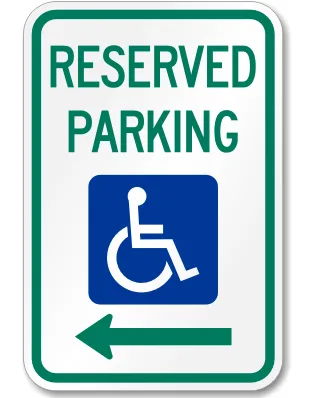
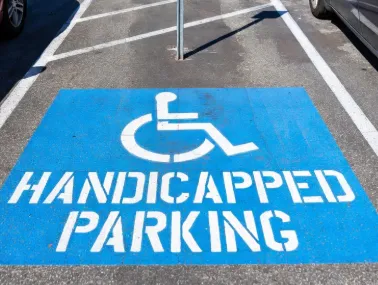
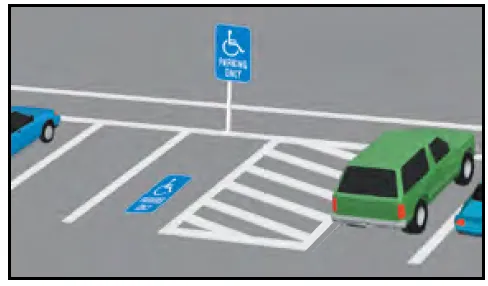 Image from dmv.ca.gov, Copyright by original authorLook for blue curbs or signs with the wheelchair symbol. Fines are massive ($250 - $1,000). Never block the "cross-hatched" lines next to a disabled spot.
 - Loading Zone:
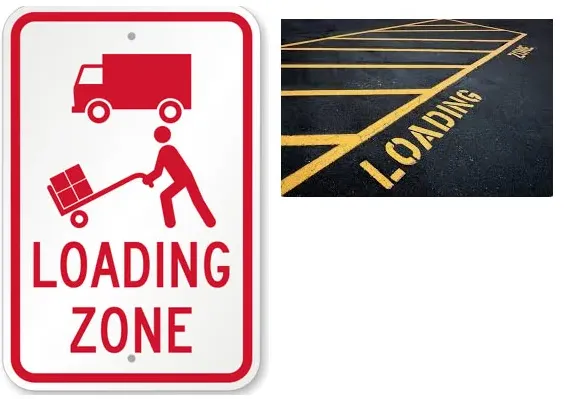 Image from https://www.myparkingsign.com/, Copyright by original authorThis area is reserved for active loading or unloading only. In many cities, commercial vehicles have priority.
 -
Distance Requirements:
-
Crosswalks: Stay 20 feet back.
-
Stop Signs/Traffic Lights: Stay 30 feet back.
-
- Temporary Signs: Paper signs taped to poles for construction or filming override all permanent signs.
Step 6: Curb Colors Explained (The Visual Cheat Sheet)
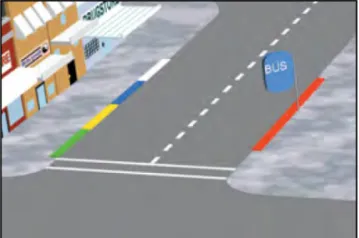
If there are no signs, the paint on the curb is your final warning:
-
Red: No stopping, standing, or parking. Ever. (Often near fire hydrants or corners).
-
White: Passenger loading/unloading only (usually 5-minute limit, like at airports or hotels).
-
Green: Short-term parking (10 to 30 minutes). Usually found near dry cleaners or post offices.
-
Yellow: Commercial loading zone. In some cities, these become open to the public after 6:00 PM or on Sundays, but always verify with local signage.
-
Blue: Disabled parking only. You MUST have a valid placard or plate.
Step 7: Master the Hill (Safety First)
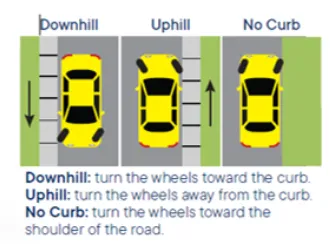
If you are on an incline, you must "curb your wheels." This is a legal requirement in cities like San Francisco.
-
Uphill (with curb): Turn wheels Away from the curb (Left).
-
Downhill (with curb): Turn wheels Toward the curb (Right).
-
No Curb: Always turn wheels Right.
-
Memory Trick: UCLA (Uphill, Curb, Left, Always).
Step 8: How to Pay Parking Meter & Pay Station (The Final Step)
Now that you have confirmed the spot is legal and safe, you must pay the "rent" for your space. In 2026, payment is almost entirely digital, but the methods vary by city block.
-
Identify the Equipment:
-
Single-Space Meters (Parking Meters):
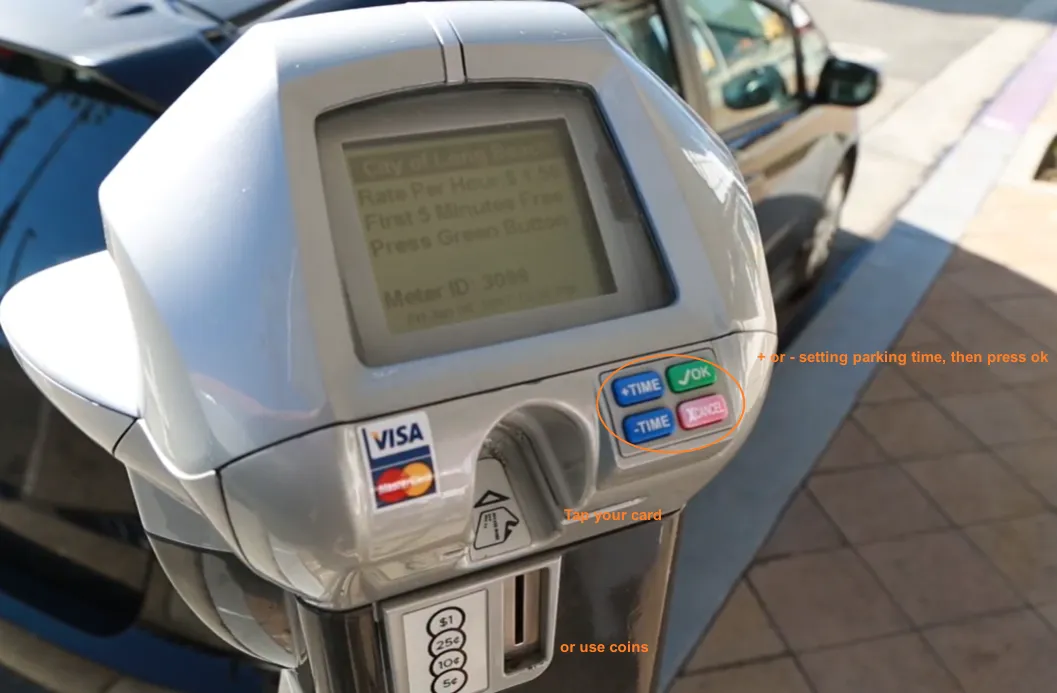 Image from LongBeachCity Youtube, Copyright by original authorParking meter allows you to park for a limited amount of time after payment. Once the time expires, your vehicle is no longer legally parked. These stand right next to your car. Most modern versions have a screen showing the expiration time. They usually accept credit/debit cards, Apple/Google Pay, and sometimes quarters. If a vehicle is not moved after the paid parking time expires, there will be a fine or the vehicle will be towed away. Some parking meters have time limits, such as 3 hours. This doesn't mean you don't have to pay after 3 hours; it means you can only park for a maximum of 3 hours. After that time, you need to renew your payment or move your car. Don't take chances; American police really do issue parking tickets. Some parking meters support extending parking time via a mobile app (see the APP section below for details).
 -
Multi-Space Pay Stations:
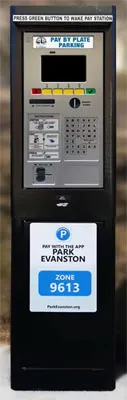
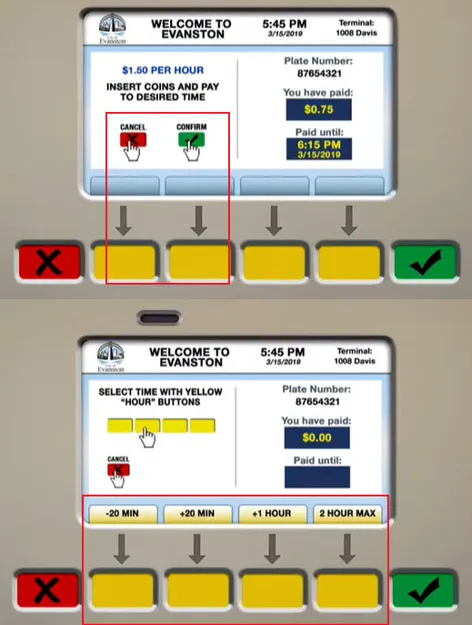 One kiosk serves the entire block. Look for signs saying "Pay to Park at Kiosk."
 After parking your car, find your parking space number (usually printed on the ground or on a pole) and write it down (some payment machines use a pay-by-plate system, in which case a parking space number is not needed) → Find the nearest Pay Station to your parking space → Enter the number or license plate number on the machine → Pay (cash/card) → Some machines require you to place the printed receipt on the dashboard, while others do not (the system has already recorded the information).
In many cities, newer payment machines or apps use a license plate payment system. You only need to correctly enter your license plate number, and the system will automatically record it, without the need to print or place any receipt on the dashboard.
-
Pay-by-Plate: You enter your license plate number at the kiosk. No paper receipt is needed on the dash.
-
Pay-and-Display: You must walk back to your car and place the printed receipt clearly on the driver's side dashboard.
-
-
-
Using Parking Apps (The Preferred Way): These apps not only help you find cheap and convenient parking spaces, but also allow you to pay for parking and extend your parking time. (See details in next chapter)
-
Look for a sticker on the meter or a nearby sign with a Zone Number (usually 4–6 digits).
-
Open ParkMobile, PayByPhone, or the city's specific app.
-
Enter the Zone Number, your vehicle's license plate, and choose your duration.
-
The "Success" Check: Always wait for the app to show a countdown timer. Take a quick screenshot of this screen as "insurance" against technical glitches or unfair tickets.
-
-
Modern Payment Tech:
-
Tap-to-Pay: Many meters now feature NFC readers. You can simply tap your phone or contactless card.
-
Pre-funding: Some apps allow you to load a "Wallet" balance to avoid small transaction fees each time you park.
-
-
Critical Time Rules:
-
The "No Re-Feeding" Rule: If a spot has a 2-hour limit, it is technically illegal to keep paying for more time from your phone once the limit is reached. Officers track "stationary vehicles," and you can get a ticket for "exceeding the time limit" even if the meter is paid.
-
The Grace Period: Some cities offer a 5-minute grace period after a meter expires, but do not rely on it. "Meter maids" are often waiting for the exact minute the clock hits zero.
-
Receipts: If using a kiosk that prints a receipt, always keep it! If you get a ticket due to a system error, that physical or digital receipt is your only way to successfully dispute the fine.
-
Chapter 3. Parking Lots & Garages in the U.S.
When street parking is too stressful or simply unavailable, off-street options are your best friend. However, they come with their own set of rules and price tags.
Public vs. Private Lots: Know the Difference
-
Public Lots: Often managed by the city (look for municipal logos). These are generally the most affordable off-street option, though they may have stricter time limits or require payment via the same apps as street parking.
-
Private Lots & Garages: Owned by companies like SP+, LAZ, or ABM. They offer convenience but use "Dynamic Pricing"—meaning a spot might be $15 on a Tuesday morning but $60 during a Saturday night concert.
Understanding Pricing Models (How to Avoid Overpaying)
Parking garages aren't just "pay by the hour" anymore. Look for these specific terms to save money:
-
Early Bird Special: This is the best deal for commuters. If you enter before a certain time (usually 9:00 AM) and leave after a specific time (usually 3:00 PM), you pay a significantly lower flat rate.
-
Flat Rates: Common in evenings and on weekends. You pay one price (e.g., $15) regardless of whether you stay for 2 hours or 10.
-
Validation: Many shopping malls, cinemas, and restaurants will "validate" your parking. This means they stamp your ticket or give you a code that makes the first 1-3 hours of parking free. Always ask: "Do you provide parking validation?"
-
Lost Ticket Fee: If the garage uses physical tickets, do not lose yours. The "Lost Ticket" fine is usually the maximum daily rate (often $40–$70).
Specialized Parking: Airports, Hotels & Downtown
-
Airport Parking: Avoid "On-Site" terminal parking if you're traveling for more than a day; it’s overpriced. Look for "Economy Lots" or "Off-Site" private lots that provide a free shuttle.
-
Hotel Parking: Many city hotels charge $50–$80 per night for "Valet Only" parking. Check nearby public garages first—you can often find a spot half a block away for $25 per day.
-
In/Out Privileges: In most private garages, your payment is for a single entry. If you drive out to grab lunch and come back, you have to pay all over again. Look for "In/Out Privileges" if you plan to move your car frequently.
Valet Parking & Tipping Etiquette
Valet is common in major U.S. cities at upscale venues.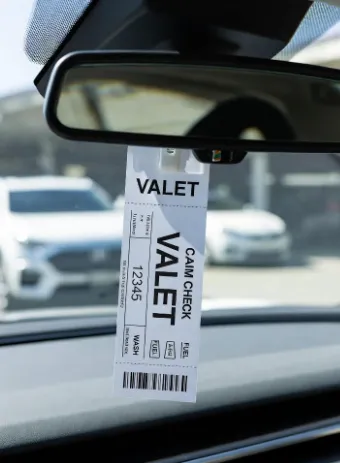
-
How it works: You pull up, leave the keys in the car, and get a small claim ticket. When you want your car back, hand the ticket to the attendant.
-
The Tipping Rule: In 2026, tipping is still expected. Standard practice is $2 to $5 given when the car is returned to you. You do not usually need to tip when dropping it off.
Chapter 4. Best Parking Apps and Payment Methods
In 2026, hunting for coins or walking two blocks to a pay station is a thing of the past. Your smartphone is your most important parking tool. Here is the breakdown of the essential apps you need to download before your trip.
1. Street Parking Giants: ParkMobile [@ Google Play] [@ Apple App Store] & PayByPhone [@ Google Play] [@ Apple App Store] 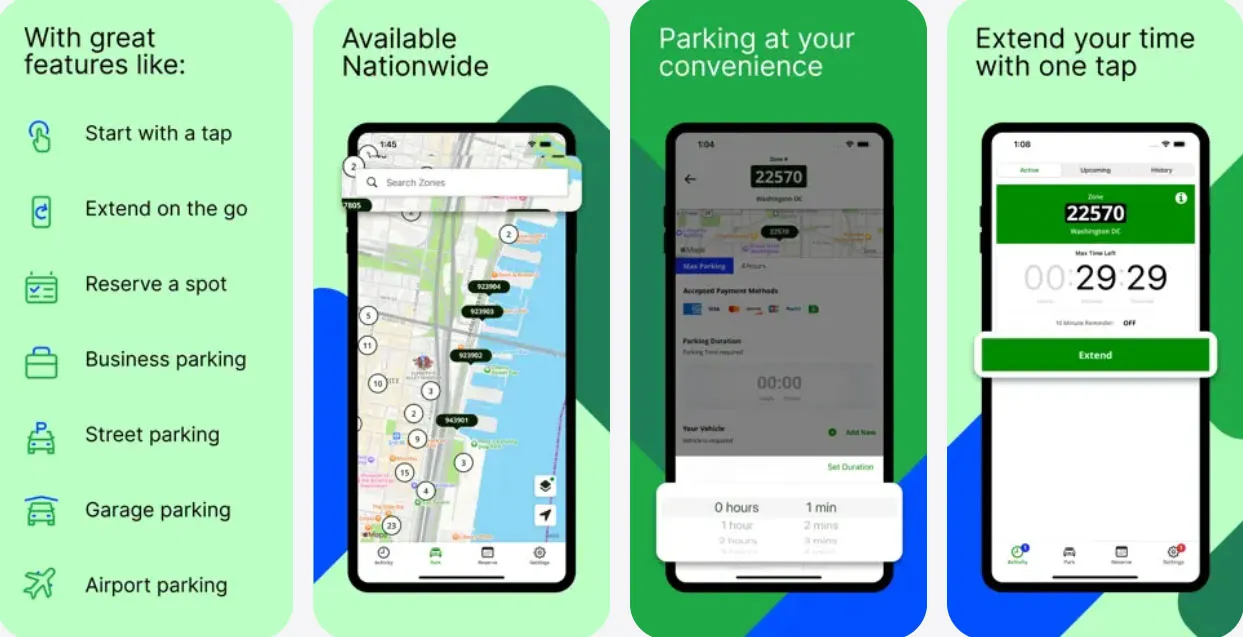
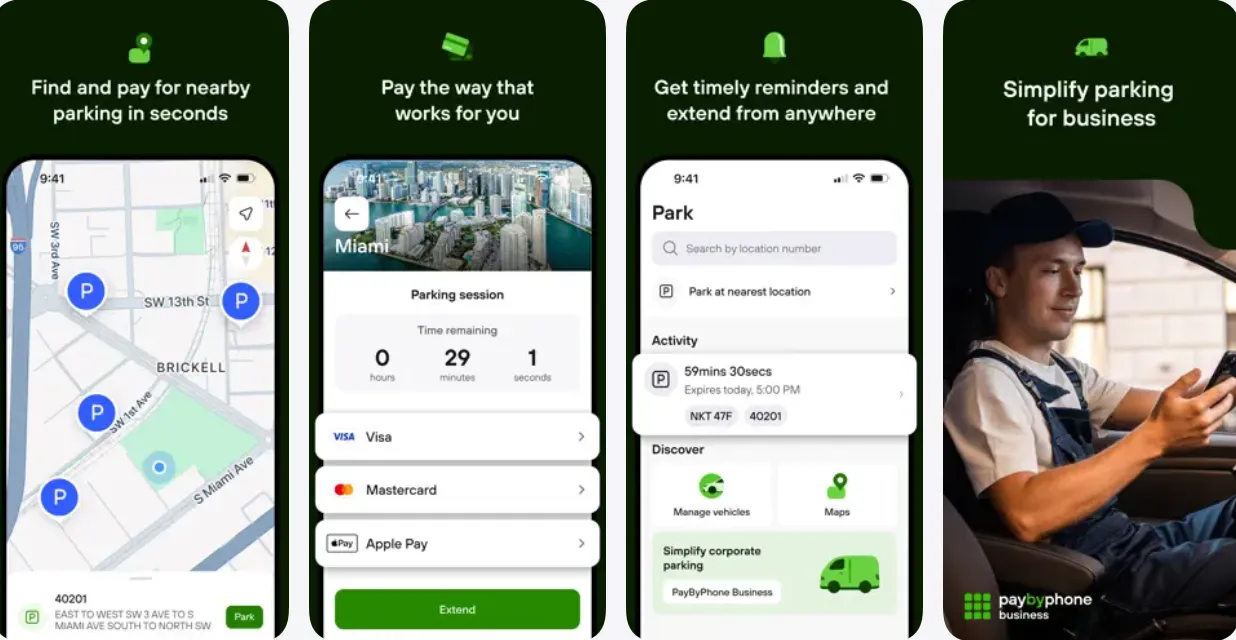
These apps are the standard for curbside parking in most major U.S. cities (like NYC, DC, LA, and Miami).
-
How they work: You find a spot, look for the "Zone Number" on the meter or a nearby sign, enter it into the app, and choose your duration.
-
The Killer Feature: Remote Extension. If your dinner is running late, you can add more time to your meter directly from your phone without walking back to the car.
-
Pro Tip: Enable "Notifications" so the app can ping you 15 minutes before your time expires.
2. Off-Street Savings: SpotHero [@ Google Play] [@ Apple App Store] & ParkWhiz
[@ Google Play] [@ Apple App Store]
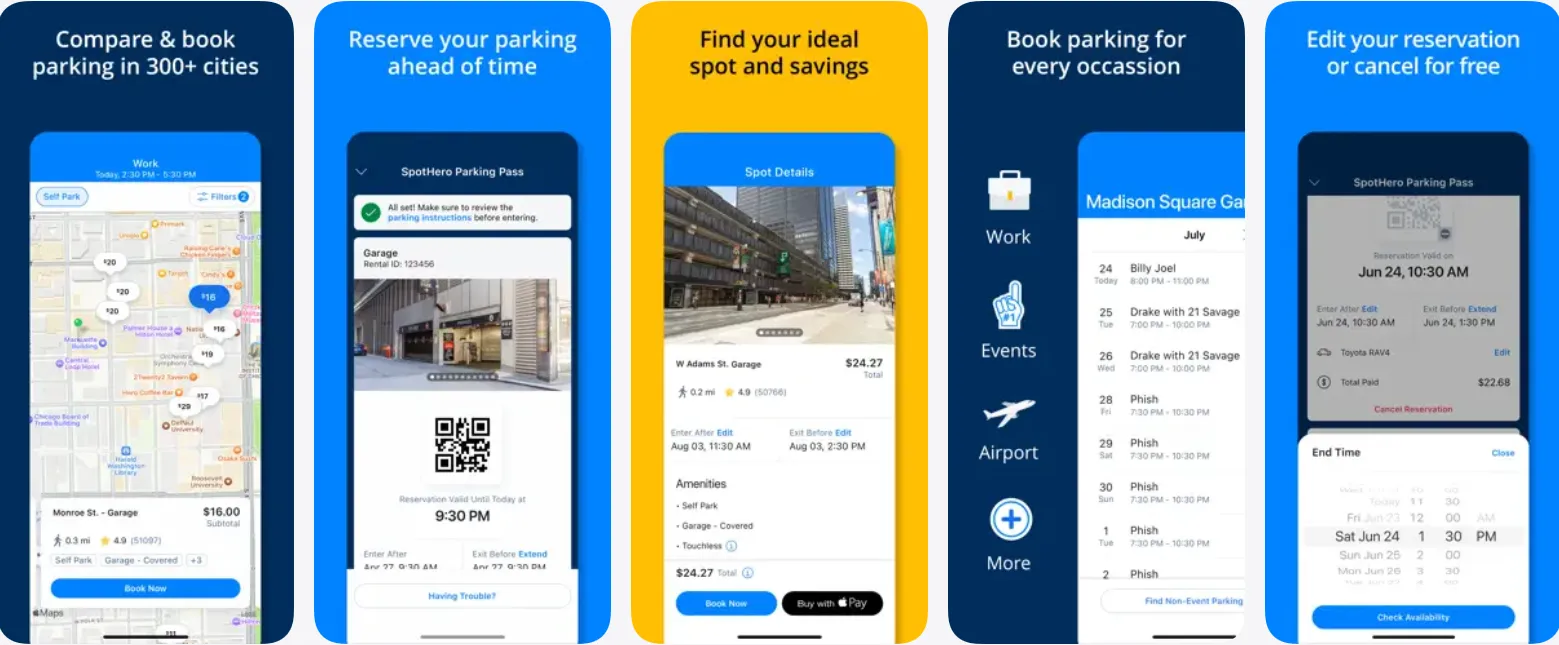
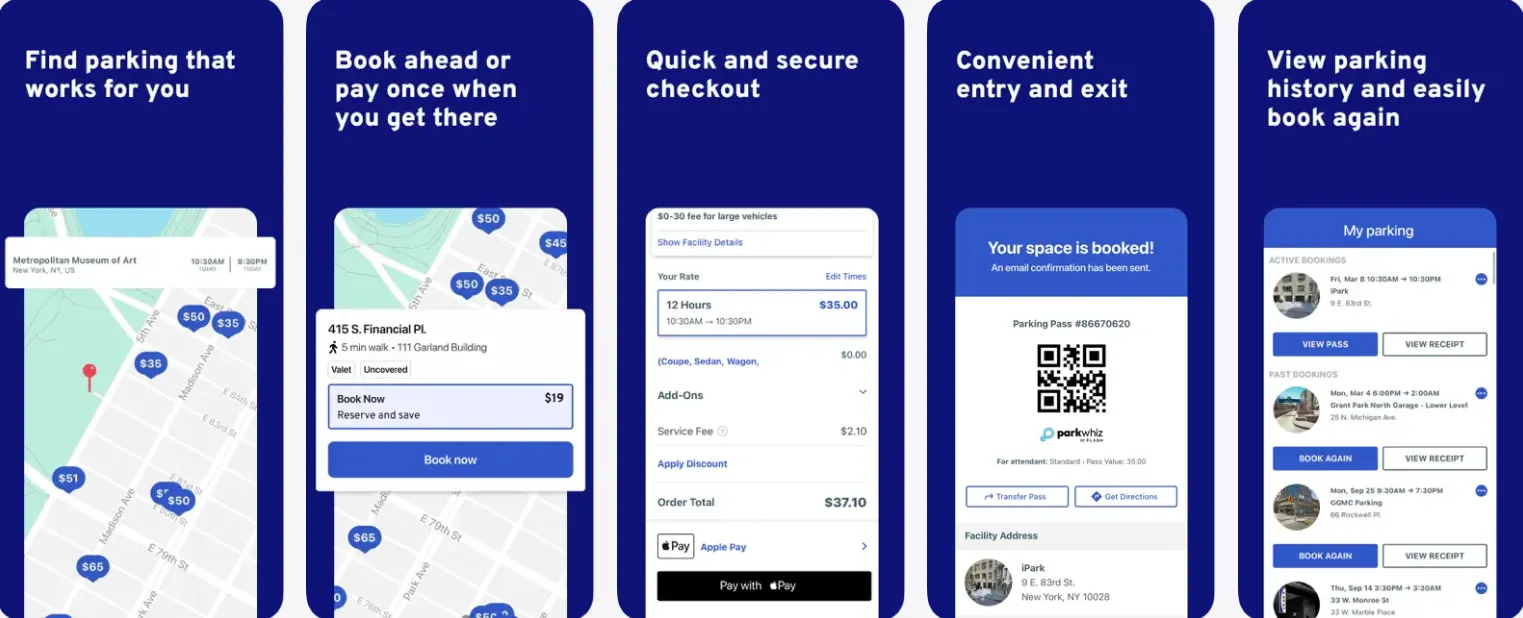
If you need a garage or a dedicated lot, never drive in and pay the "drive-up" rate.
-
The Strategy: Use SpotHero or ParkWhiz to reserve a spot in advance. You can often save 30% to 50% compared to the daily rate posted at the garage entrance.
-
How it works: You book through the app, get a QR code, and scan it at the garage gate (entry and exit).
-
Best for: Sightseeing in crowded downtowns or parking near stadiums for games/concerts.
3. Comparison & Discovery: BestParking [@ Google Paly] [@ Apple App Store] & Google Maps
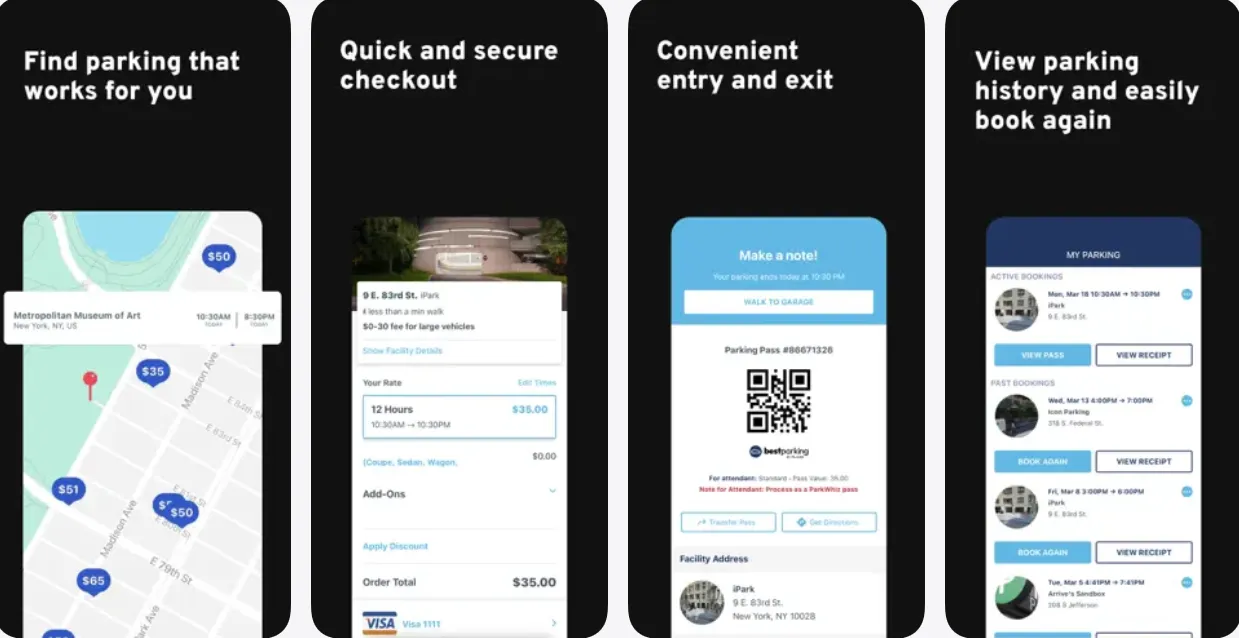
-
BestParking: Excellent for comparing the real-time prices of every garage in a specific area. It helps you find that one hidden lot that is $10 cheaper than the one across the street.
-
Google Maps: Many people forget that Google Maps now has a "Parking Difficulty" icon (P) in many cities and sometimes offers a "Find Parking" link that integrates with SpotHero.
4. Direct Payment Methods: Apple/Google Pay & Tap-to-Pay
Most modern meters in 2026 are equipped with NFC readers.
-
If you don't want to download an app for a one-time park, you can usually just tap your phone or your "contactless" credit card on the meter.
-
Warning: Some older meters still only take physical credit cards or quarters. Always keep $5 in quarters in your glove box for emergencies!
Common App Pitfalls (Don't Get These Wrong)
-
Wrong License Plate: If you have multiple cars or a rental, ensure the active plate in the app matches your current vehicle. "Meter maids" scan plates, not stickers.
-
Wrong Zone ID: Some streets have different zones on opposite sides of the road. Double-check the sign closest to your car.
-
The "Transaction Fee": Most apps charge a small convenience fee (usually $0.30–$0.50). While annoying, it's much cheaper than a $65 ticket.
-
No Service Areas: In deep underground garages, you might lose signal. Take a screenshot of your QR code/reservation before you drive into the garage!
Chapter 5. Parking Tickets, Fines & Towing – What to Do
Even the most careful drivers can slip up. If you find a ticket or, worse, an empty space where your car used to be, follow these steps.
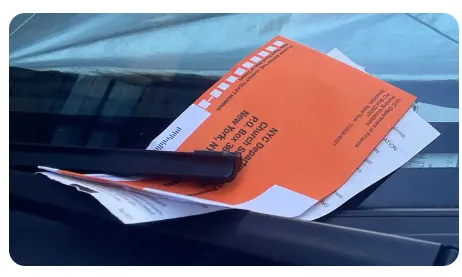
Parking Tickets Explained: Dealing with the Orange Envelope
-
Common Violations & Estimated Fines (2026 Averages):
-
Expired Meter: $45 – $85 (Highest in NYC/SF).
-
Street Cleaning: $60 – $110.
-
Fire Hydrant: $100 – $180.
-
Disabled Space (Unauthorized): $250 – $500+.
-
-
How to Pay: Almost all tickets have a QR code or website on the back. Pay within 14–21 days. If you wait, the fine can double or even triple due to "Late Penalties."
-
How to Dispute (Contest) a Ticket:
-
Evidence is King: If the meter was broken, take a video of it not working. If the sign was covered by a tree branch, take a photo from the driver's perspective.
-
Online Portal: Most cities have a "Request a Review" button on their parking website. Write a polite, factual statement and upload your photos.
-
Common Winning Arguments: "Signage was missing/obscured," "Meter malfunction," or "Vehicle was sold/stolen" (with documentation).
-
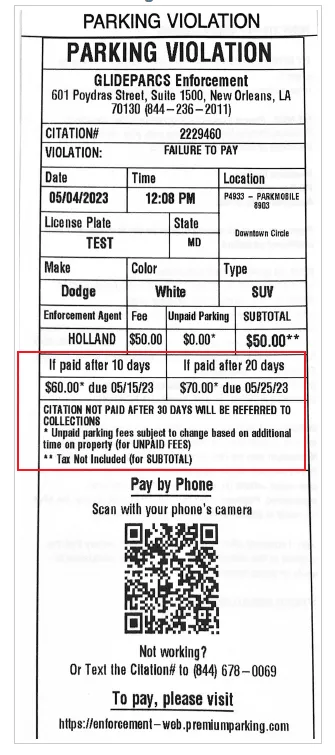
Notice: Failure to pay traffic fines will result in late fees, and may even lead to restrictions on or seizure of your vehicle registration/license plates. It is crucial to handle these fines within the specified timeframe. Some tickets indicate the amount due within a certain number of days, and how much the amount will increase if paid later. Therefore, pay the fine as soon as possible after confirming its accuracy. 👇
What to Do If Your Car Is Towed (The Nightmare Scenario)
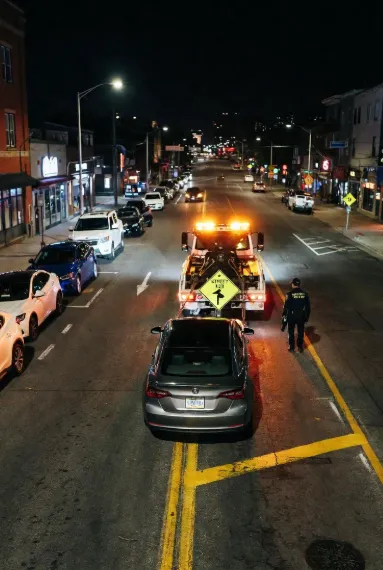
If you return and your car is gone, don't assume it was stolen—it was likely towed.
-
Find Your Vehicle: * Look for a small sign at the entrance of the lot or on the street pole. It will list the name of the towing company and their phone number.
-
If there's no sign, call the local Police non-emergency line (311 in many cities) and give them your plate number. They maintain a database of "Impounded" vehicles.
-
-
The "Impound Lot" Visit:
-
Documents Needed: You MUST bring your Driver’s License, Proof of Insurance, and Vehicle Registration. If you are in a rental, bring the rental agreement.
-
The Cost: You will have to pay the "Towing Fee" (often $200+) plus a "Storage Fee" (around $50–$100 per day).
-
Important: Tow lots are often in sketchy industrial areas and many are CASH ONLY or charge a massive credit card fee. Call ahead to check.
-
The "Boot": When Your Wheel is Locked
If you have 3 or more unpaid parking tickets, some cities will put a "Boot" (a large metal clamp) on your wheel.
-
Do NOT try to drive with a boot on. You will destroy your car.
-
You usually have to pay all ownershop fines plus a "de-booting fee" over the phone to get the code to unlock it or to have a technician come out.
Parking Safety & Vehicle Security
In many major U.S. cities, "smash-and-grab" car burglaries are a serious concern. A parking spot might be legal, but it may not be safe.
1. The "Nothing in Sight" Rule
-
The Rule: Leave absolutely nothing visible on your seats, dashboard, or floorboards.
-
Why it matters: In cities like San Francisco or Los Angeles, even a visible empty backpack, a handful of spare change, or a charging cable can be enough for a thief to break your window.
-
Pro Tip: If you have luggage, put it in the trunk before you arrive at your parking destination. Thieves often watch parking lots to see people moving items into their trunks.
2. Spotting the Warning Signs
-
Check the ground: If you see piles of small glass shards (broken windows) in a parking area, move on. It is a clear sign that the area is frequently targeted by car burglars.
-
Lighting: Always prioritize well-lit areas or parking garages with 24/7 security/cameras over dark side streets.
3. Electronic Security & Signal Blocking
-
Bluetooth/Wi-Fi: High-end thieves sometimes use signal detectors to find hidden laptops or tablets in car trunks. Turn off your devices or put them in "Airplane Mode" rather than just closing the lid.
-
Key Fob Protectors: If you are staying in a ground-floor hotel room near your car, consider a "Faraday pouch" for your key fob to prevent signal-relay car thefts.
4. High-Risk Models & Anti-Theft Tools
Certain older car models (especially some 2011–2021 Kia and Hyundai models) are higher targets for theft. If you are renting one of these, consider using a Steering Wheel Lock (like "The Club") when parking in urban areas.
Common Parking Mistakes and Traps to Avoid
Parking in the U.S. is as much about what you don't do as what you do. Even veteran drivers fall for these traps.
1. The "Residential Permit" Trap
-
The Mistake: Parking on a street because it looks like a normal public road.
-
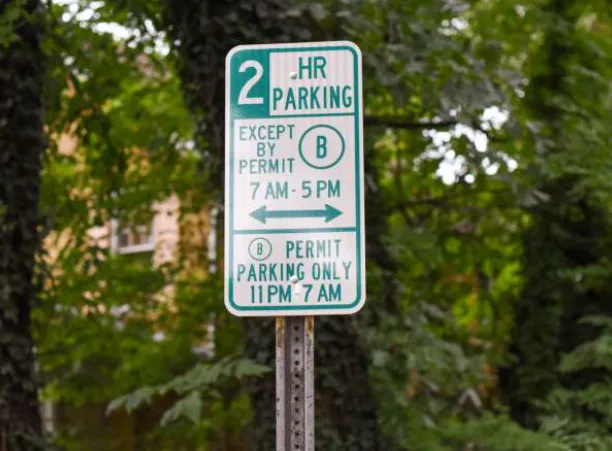
The Reality: In neighborhoods near downtown or universities, parking is often reserved for residents. Look for small signs that say "Permit Required - Area A" or "2 Hour Parking Unless Permit Holders."
-
The Risk: You will be ticketed within 30 minutes. Some cities tow permit violators immediately if they block narrow streets.
2. Directional Parking (Wrong Way Parking)
-
The Mistake: Parking your car facing against the flow of traffic (on the left side of a two-way street).
-
The Reality: In most of the U.S., your vehicle must be parked in the direction of traffic flow. If your passenger door is against the curb on a two-way street, you are parked illegally.
-
Pro Tip: This is a very common ticket for international drivers used to more flexible parking laws.
3. The "Street Cleaning" Countdown
-
The Mistake: Parking the moment the street sweeper vehicle passes your car.
-
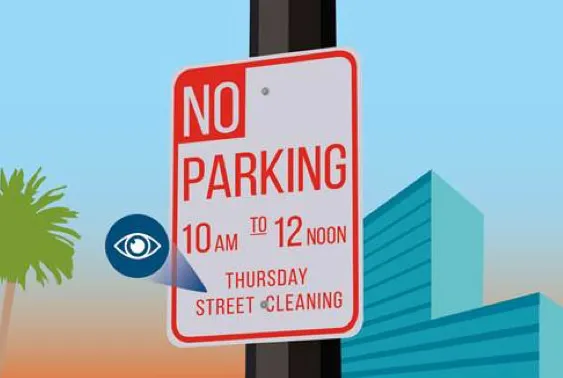
The Reality: If the sign says "No Parking 8:00 AM - 10:00 AM," you cannot park there until exactly 10:01 AM.
-
The Trap: Traffic officers often follow right behind the sweeper specifically to ticket people who park immediately after it passes.
4. The "Temporary No Parking" Paper Sign
-
The Mistake: Ignoring a piece of paper taped to a tree or pole.
-
The Reality: These are official "Temporary No Parking" signs for construction, moving trucks, or film crews. They usually go up 24–48 hours in advance.
-
The Trap: These signs override all permanent signs. If a permanent sign says "Free Parking" but a temporary one says "No Parking," the temporary one wins. Your car will be towed.
5. The Fire Hydrant "Safe Zone" Illusion
-
The Mistake: Parking 5 feet away from a hydrant because there is no red paint on the curb.
-
The Reality: You must stay 15 feet away from a fire hydrant regardless of whether the curb is painted red.
-
Pro Tip: Use the "one car length" rule of thumb to be safe.
6. Parking App "Session Failures"
-
The Mistake: Closing the app before the "Success" screen appears.
-
The Reality: If your payment doesn't process or the app glitches, you don't have a valid session.
-
The Trap: Always wait for the confirmation message and take a screenshot of the active session. If you get a ticket due to a system error, that screenshot is your only way to win a dispute.
7. Rental Car "Convenience" Fees
-
The Mistake: Thinking the rental company will just "forward" the ticket to you.
-
The Reality: Rental agencies automatically pay the fine using your credit card on file and then add a $30–$50 "Administrative Fee" per ticket.
-
The Save: Pay the ticket online directly to the city before the rental company finds out.
Final Parking Tips & Action Checklist
-
Before you park: Check the curb, read the closest sign, and look for "Zone" stickers.
-
While your car is parked: Set a timer on your phone for 10 minutes before your time expires.
-
If you get towed: Don't panic. Call the number on the sign and have your VIN or License Plate ready.
FAQ
Q: Is parking free on Sundays?
A: Often yes, but not always. Check the meter or the sign. If the meter says "Enforced 7 days a week," you have to pay.
Q: Can tourists get tickets?
A: Yes. Your rental agreement makes you liable for all fines.
Q: What if I ignore a ticket?
A: The fine will double or triple. Eventually, the city might "boot" your car (lock the wheel) or send the debt to collections, which can affect your credit or future entry into the U.S.
Q: Can I park overnight?
A: In many suburbs, yes. In big cities, check for "No Parking 2 AM - 6 AM" signs or street cleaning schedules.
Q: How do rental companies handle tickets?
A: They usually charge your card on file + a fee. Always try to pay the ticket online directly to the city as soon as you get it.
Appendix: 📍 Official City Parking Portals (Pay Tickets & Check Rules)
🏙️New York
NYC DOT Parking Regulations Map
🌉 San Francisco
🌴 Los Angeles
Los Angeles Official Towed Vehicle Locator
🏞️ Chicago
🐦 Seattle
🌇 Boston
Quick Reference Tools
-
Gridwise: Useful for finding "event parking" schedules.
-
FreeParkingCity: A community-driven map for finding rare free spots in urban centers.