Welcome to the 2026 edition of our ultimate guide to navigating the United States. Whether you’re staring at a ten-lane freeway in LA or trying to decipher the subway map in NYC, the right apps are the difference between a smooth ride and a total meltdown.
Why Transportation Apps Are Essential in the United States
How Americans Actually Get Around
In the US, how you move depends entirely on where you are. In "Car-Centric Cities" like Houston or Phoenix, a car isn't a luxury—it's your legs. In "Transit-Oriented Cities" like New York, Chicago, or San Francisco, owning a car is often a liability. Apps bridge this gap, helping you switch between a subway train and an Uber seamlessly.
Why apps are often more reliable than physical signage
Believe it or not, digital data in the US is often updated faster than physical signs. If a bus stop is moved due to construction or a highway exit is closed for an accident, your app will know 20 minutes before you see a single orange cone.
Who This Guide Is For
-
Short-term Visitors: If you’re here for two weeks, you need apps that don't require complex registrations or local bank accounts.
-
Long-term Residents Without a Car: You’ll need a "stack" of apps to survive: transit for the commute, bikes for the "last mile," and rideshare for those rainy nights.
-
First-time US Drivers: US roads are fast and exits can be confusing. You need navigation that talks you through the lanes.
📍Best Navigation Apps for Driving, Walking, and Transit
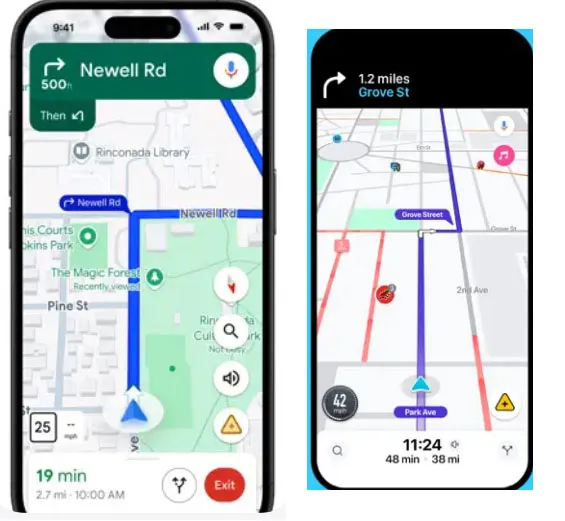
Navigating the vast and varied landscapes of the U.S. requires more than just a map; you need real-time data to outsmart traffic and master complex highway exits. Whether you are behind the wheel of a rental car, trekking through downtown on foot, or timing your arrival with the city bus, these three giants offer distinct advantages tailored to your specific travel style.
Google Maps — The Most Accurate Navigation App in the US
[Download @ Google Play] [Download @ App Store]
Google Maps remains the global gold standard for digital mapping, offering the most comprehensive database of businesses, transit schedules, and topographical data in the United States.
-
The Vibe: The "Old Reliable" that everyone has.
-
Scenario: You’re in a new city and need to find a coffee shop, see if it’s open, check the reviews, and then figure out if it’s faster to walk or take the bus.
-
works exceptionally well for: Seamlessly switching between different modes of transport within a single trip.
-
Pros: Unmatched POI (Point of Interest) database; superior "Live View" AR walking directions; reliable transit arrival times.
-
Cons: Can be memory-intensive on older phones; occasionally suggests overly conservative routes during heavy traffic.
-
Best for: All-in-one planning and tourists exploring unfamiliar urban areas.
Waze — Best for Real-Time Traffic Alerts
[Download @ Google Play] [Download @ App Store]
Waze is a community-driven navigation app that relies on millions of active users to report road hazards, police presence, and traffic jams in real-time.
-
The Vibe: Like a CB radio for the 21st century.
-
Scenario: You’re commuting on the I-405 in LA. Waze suddenly tells you to "Take the next exit" because there’s a pothole or a police speed trap ahead that was reported by a user 30 seconds ago.
-
works exceptionally well for: Finding aggressive shortcuts through side streets to bypass highway gridlock.
-
Pros: Fastest real-time rerouting; early warnings for road debris and speed traps; fun voice customization options.
-
Cons: Interface can feel cluttered with icons; drains battery faster due to constant GPS/data pings; lacks robust transit or walking features.
-
Best for: Daily commuters and long-distance drivers who want to shave 5 minutes off their ETA.
Apple Maps — Best for iPhone Users
Once the underdog, Apple Maps has been completely rebuilt with stunning 3D details, lane-level guidance, and deep integration into the Apple ecosystem.
-
The Vibe: Clean, pretty, and deeply integrated.
-
Scenario: You’re driving and your Apple Watch vibrates on your wrist to tell you your turn is coming up. The 3D landmarks in cities like DC make it much harder to miss your turn at a complex intersection.
-
works exceptionally well for: High-precision driving in major metropolitan areas with complex lane configurations.
-
Pros: Beautifully rendered 3D city maps; excellent privacy protections; smooth Siri integration and Apple Watch haptic feedback.
-
Cons: Only available on Apple devices; POI reviews are often less numerous than Google's; web-based version is limited.
-
Best for: Privacy-conscious users and those who love the Apple ecosystem.
Google Maps vs Waze vs Apple Maps (In-Depth Comparison)
|
Comparison Factor |
Google Maps |
Waze |
Apple Maps |
|---|---|---|---|
|
Routing Accuracy & Traffic Data |
High. Uses massive historical & real-time data for reliable ETAs. |
Dynamic. Hyper-aggressive rerouting based on user reports. |
Good. Strong in cities, but sometimes lags behind on obscure road closures. |
|
Driving Experience vs. Walking & Transit |
Excellent Balanced. Best-in-class for transit and walking AR. |
Driver-Only. Optimized for cars; virtually no walking/transit support. |
Superior Visuals. Stunning 3D city views and great lane-level guidance. |
|
Coverage: Cities vs. Rural Areas |
Universal. Reliable in both mega-cities and remote national parks. |
Crowd-Dependent. Most effective in high-traffic urban corridors. |
Metropolitan Focus. Exceptional in major US hubs; okay in rural areas. |
|
Interface, Ease of Use & Ecosystem Integration |
Utility-First. Information-heavy; integrates perfectly with Google Workspace. |
Social/Playful. Gamified UI; integrates with Spotify/Audio apps. |
Minimalist. Cleanest UI; deep integration with Apple Watch & CarPlay. |
|
Battery Usage, Data Consumption & Privacy |
Moderate. Constant data syncing; uses Google's standard data policies. |
High. Drains battery quickly due to constant community updates. |
Optimized. Best battery efficiency on iPhone; industry-leading privacy. |
|
Best Use Cases & Final Recommendation |
The "Survival" Tool. Best for tourists and car-free urban explorers. |
The "Commuter" Tool. Best for avoiding speed traps and rush-hour jams. |
The "Lifestyle" Tool. Best for iPhone power users who want a premium UI. |
Best Rideshare Apps: Uber, Lyft, and Taxi Apps
When public transit isn't an option or you're carrying heavy luggage, ridesharing is the backbone of American urban mobility. While the industry is dominated by two primary giants, the choice between them often comes down to current wait times, surge pricing, and specific regional availability. From luxury sedans to cost-effective pooled rides, these apps ensure you're never stranded, regardless of the hour.
Uber — The Most Widely Available
[Download @ Google Play] [Download @ App Store]
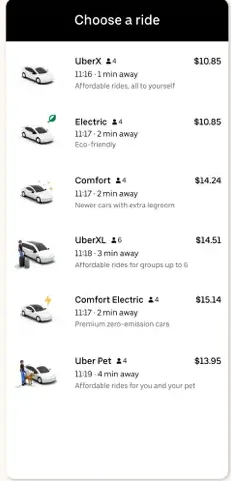
The original disruptor, Uber provides a massive network of drivers across nearly every corner of the U.S., offering everything from budget rides to luxury SUVs.
-
The Vibe: The giant that’s everywhere.
-
Scenario: It’s 2 AM in a small town in Ohio. Uber is likely your only hope of finding a ride home when traditional taxis have stopped running.
-
works exceptionally well for: Reliable airport transfers and late-night safety in unfamiliar areas.
-
Pros: Massive driver network; "Uber Reserve" for scheduled trips; integrates with Uber Eats for easy food ordering.
-
Cons: Surge pricing during rush hour or rain can be astronomical; driver quality can vary significantly.
-
Best for: International travelers and those needing 24/7 availability nationwide.
Lyft — The Friendly Alternative
[Download @ Google Play] [Download @ App Store]
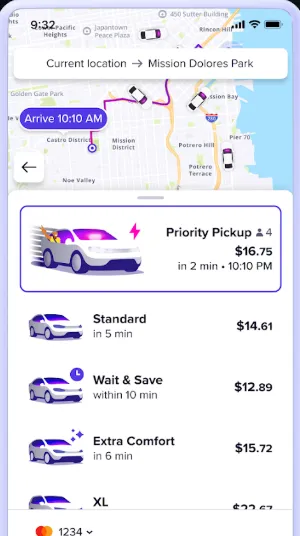
Lyft is the primary competitor to Uber, often praised for its "pink" branding and a perceived focus on better driver-rider relationships.
-
The Vibe: Often slightly cheaper, with a more "local" feel.
-
Scenario: You’re in downtown Seattle or San Francisco. You cross-check the price on Lyft and find it’s $5 cheaper than Uber because they have a "Wait & Save" option.
-
works exceptionally well for: Budget-conscious urban travel where you have a few extra minutes to wait for a ride.
-
Pros: Transparent pricing; "Wait & Save" discounts; frequent partnership rewards (e.g., Delta SkyMiles).
-
Cons: Smaller coverage area than Uber in rural regions; wait times can be longer during off-peak hours.
-
Best for: Urban dwellers and students looking for the best deal.
Curb and Arro — The "Old School" New Way
[Download Curb @ Google Play] [Download Arro @ Google Play] [Download Curb @ App Store] [Download Arro @ App Store]
-
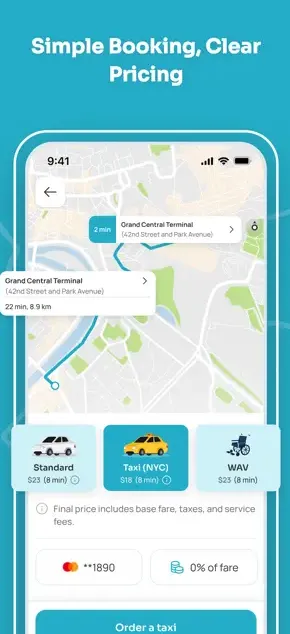
The Vibe: Yellow cabs meet the smartphone age.
-
Scenario: You’re in NYC and "Surge Pricing" has made Uber $80. You use Curb to hail a standard yellow taxi for a flat, regulated meter rate.
-
works exceptionally well for: Avoiding surge pricing during peak hours in major hubs like NYC, Chicago, or Boston.
-
Pros: No surge pricing; access to professional, licensed drivers; supports "Pair & Pay" where you hail a cab on the street but pay via the app.
-
Cons: Only available in specific major cities; app interfaces are often less polished than Uber/Lyft.
-
Best for: Big city residents and travelers who want to stick to regulated taxi fares.
Uber vs Lyft vs Taxi Apps(Curb / Arro)(In-Depth Comparison)
|
Comparison Factor |
Uber |
Lyft |
Taxi Apps (Curb/Arro) |
|---|---|---|---|
|
Pricing Structure & Surge Pricing |
Algorithmic. High surge during peak hours/rain. |
Algorithmic. Similar to Uber; offers "Wait & Save" for discounts. |
Regulated. Fixed meter rates; no surge pricing. |
|
Availability & City Coverage |
Dominant. Available nationwide, including rural areas. |
High. Strong in cities/suburbs; less available in remote areas. |
Urban-Only. Limited to major metros (NYC, Chicago, etc.). |
|
Wait Time & Reliability |
Fastest. Largest fleet usually means the shortest wait. |
Varies. Often comparable to Uber in big cities. |
Moderate. Reliable in city centers; difficult in outskirts. |
|
Airport Pickups & Drop-offs |
Seamless. Designated zones at almost every US airport. |
Seamless. Excellent airport integration and reservation options. |
Reliable. Taxis often have "flat rates" for specific airport routes. |
|
Safety Features & Regulation |
In-App. GPS tracking, PIN verification, 911 button. |
In-App. Share trip info, emergency assistance features. |
Official. Licensed drivers; background checks managed by city. |
|
Payment Methods & Tipping |
Cashless. Card, Apple/Google Pay, Venmo; In-app tipping. |
Cashless. Card, Apple Pay, PayPal; In-app tipping. |
Hybrid. App payment or in-cab credit card; traditional tipping. |
|
Cost vs. Convenience Trade-off |
Premium Convenience. You pay for speed and availability. |
Value-Focused. Often slightly cheaper with wait discounts. |
Stable Value. Best during rain/events when surge is high. |
|
Ride Types & Vehicle Options |
Vast. X, XL, Black, Green, Pet, Shared. |
Diverse. Personal, XL, Lux, Black, Wait & Save. |
Standard. Yellow/Green cabs; wheelchair accessible (WAV). |
|
Best Use Cases & Final Recommendation |
The "Everywhere" Choice. Best for late nights and airport runs. |
The "Value" Choice. Best for routine city travel on a budget. |
The "Anti-Surge" Choice. Best during storms or massive city events. |
Best Public Transit Apps for US Cities
While driving is king in much of the country, mastering the public transit systems of major U.S. hubs like New York, Chicago, or San Francisco is essential for any savvy traveler. These apps do more than just show schedules; they offer real-time GPS tracking, "get off" alerts, and detailed transfer instructions to help you navigate the urban jungle like a local. Whether you're timing a bus in the rain or finding the right subway entrance, these tools are your digital compass for city mobility.
Transit App — The Real-Time King
[Download @ Google Play] [Download @ App Store]
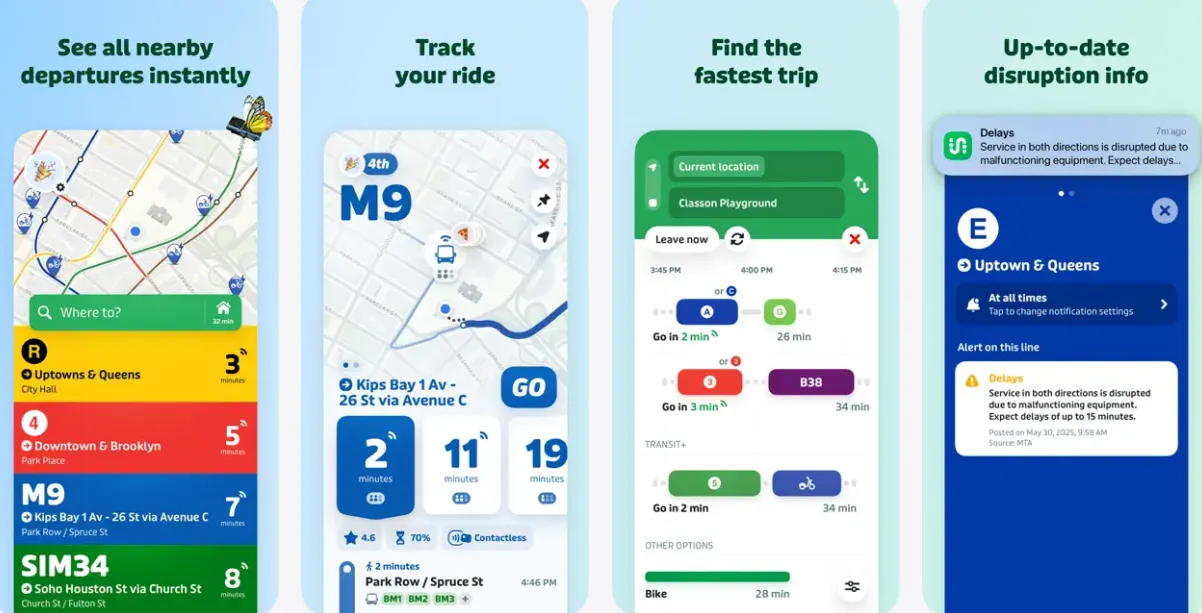
Transit is a visually striking, highly intuitive app that specializes in real-time tracking for buses, trains, and subways across hundreds of U.S. cities.
-
The Vibe: Bright colors and incredibly accurate "GO" mode.
-
Scenario: You’re standing at a rainy bus stop in Portland. The "GO" feature crowdsources the bus's location from other riders, telling you exactly where it is on the map.
-
works exceptionally well for: Getting precise "minute-by-minute" countdowns for your next bus or train.
-
Pros: Highly accurate crowdsourced data; multi-modal planning (includes bikes/scooters); works offline for schedules.
-
Cons: Full "Royale" subscription required for some advanced features; can feel cluttered with too many nearby options.
-
Best for: Daily commuters who rely on bus and light rail systems.
Moovit — Best for Broad Coverage
[Download @ Google Play] [Download @ App Store]
Moovit is a comprehensive urban mobility app that provides a massive amount of transit data for cities large and small, including step-by-step navigation.
-
The Vibe: The traveler’s encyclopedia.
-
Scenario: You’re visiting a smaller city like Columbus or Charlotte where other apps might struggle. Moovit usually has the local schedule data updated.
-
works exceptionally well for: International travelers who want a consistent interface used in 100+ countries.
-
Pros: Massive global database; useful "Get Off Alerts" to prevent missing your stop; very accessible UI.
-
Cons: Contains more in-app advertisements than competitors; occasionally less accurate "real-time" data than Transit App.
-
Best for: Global travelers and visitors to mid-sized American cities.
Citymapper — Best for Complex Urban Jungles
[Download @ Google Play] [Download @ App Store]
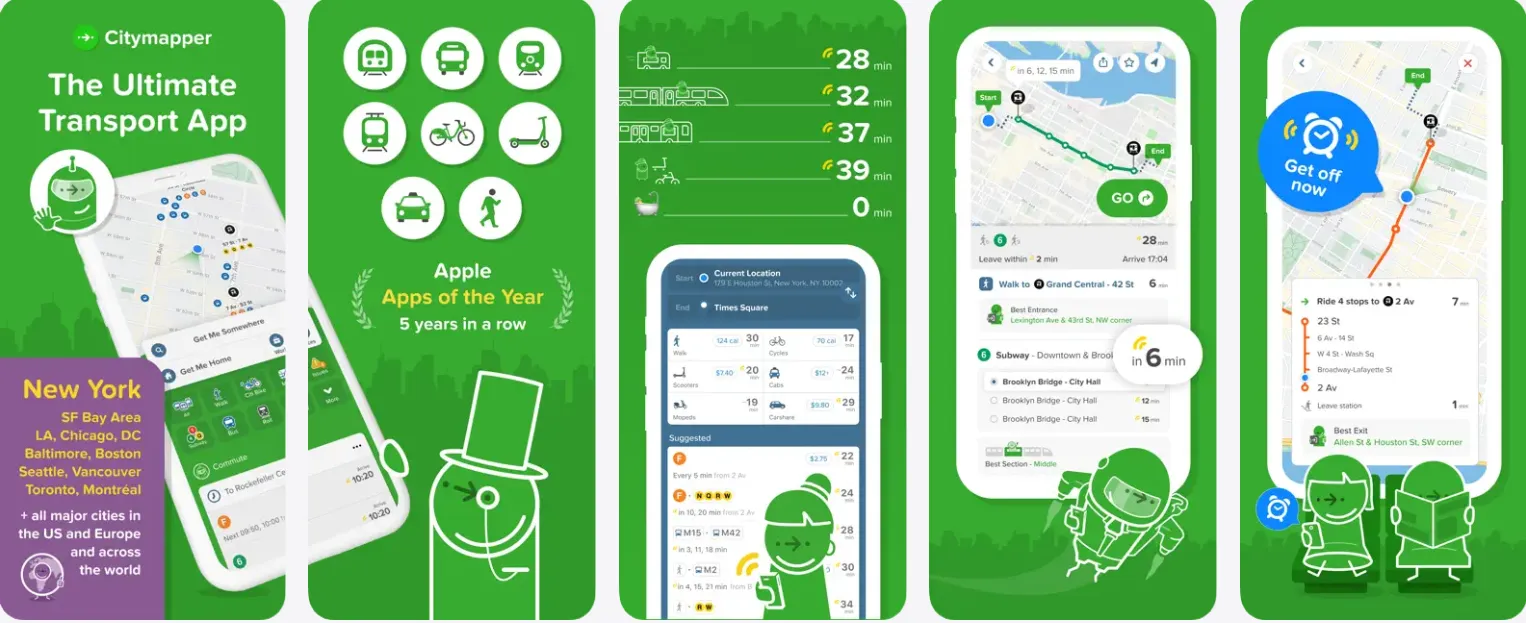
Designed for the world's most complicated transit systems, Citymapper breaks down every leg of your journey with obsessive detail.
-
The Vibe: For the person who wants to know which subway car to board.
-
Scenario: You’re in the maze of the Chicago "L" or the NYC Subway. Citymapper tells you to "get in the front carriage" so you’re right next to the exit at your destination.
-
works exceptionally well for: Complex underground transfers in major metros like NYC, SF, and Chicago.
-
Pros: Precise "best section of the train" advice; calorie tracking and cost comparisons; excellent "main screen" overview.
-
Cons: Only supports major "hub" cities; can be overwhelming for simple bus trips.
-
Best for: Power users in mega-cities like New York or San Francisco.
Official City Transit Apps (Essential for Payments)
While navigation apps are great for planning, official city apps are often required for mobile ticketing and fare management.
-
MTA (NYC): The definitive source for real-time New York City subway and bus delays.
-
Clipper (SF): The digital card you need to tap-and-go on BART, MUNI, and Caltrain.
-
TAP (LA) / Ventra (Chicago): Essential apps for loading passes and managing transit accounts.
Transit vs Moovit vs Citymapper (In-Depth Comparison)
|
Comparison Factor |
Transit App |
Moovit |
Citymapper |
|---|---|---|---|
|
City Coverage & Supported Agencies |
Extensive. Over 300 US cities; supports bus, rail, and ferry. |
Massive. Best for small/mid-sized cities; global database. |
Metropolitan. Focused on Tier 1 hubs (NYC, SF, Chicago, etc.). |
|
Real-Time Data Accuracy |
Superior. Crowd-sourced "GO" mode offers live GPS tracking. |
Good. Primarily relies on agency feeds; occasional lags. |
High. Very accurate for major city rail and subway systems. |
|
Multi-Modal Trip Planning |
Excellent. Seamlessly mixes transit with bikes, scooters, and Uber. |
Robust. Includes e-scooter and bike-share data well. |
Unmatched. Most detailed transfer instructions (best car/exit). |
|
Route Optimization & ETA Reliability |
Best for Bus. Real-time countdowns are industry-leading. |
Reliable. Solid turn-by-turn navigation for first-time riders. |
Best for Subway. Optimizes for the shortest walking distance. |
|
User Interface & Ease of Use |
Visually Modern. Clean, colorful, and gesture-driven UI. |
Information-Heavy. Functional but can feel cluttered with ads. |
Playful & Detailed. High-precision maps with a tech-savvy vibe. |
|
Ticketing & Fare Integration |
Growing. Native ticketing for many agencies (e.g., RTD Denver). |
Functional. Integrated mobile payment in select partnerships. |
Limited. Focuses on navigation over direct payment processing. |
|
Best Use Cases & City-Specific Strengths |
The "Commuter" Choice. Best for daily bus/rail users nationwide. |
The "Global" Choice. Best for travelers visiting mid-sized cities. |
The "Power User" Choice. Best for NYC/Chicago subway mazes. |
Best Parking and Driving Apps
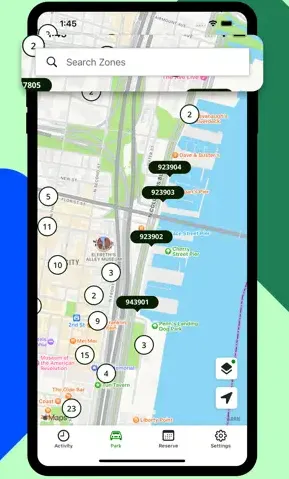
Driving in a major U.S. city often leads to the same frustrating question: "Where am I supposed to park?" Between confusing street signs, expensive garages, and the transition to electric vehicles, managing your car requires a specialized set of tools. These apps take the guesswork out of urban driving, allowing you to pay for street meters from your phone, reserve discounted garage spots in advance, or locate the nearest EV charging station with ease.
ParkMobile — For Street Parking
[Download @ Google Play] [Download @ App Store]
The most common street parking app in the U.S., used by cities to eliminate physical meters and coin payments.
-
The Vibe: No more hunting for quarters for the meter.
-
Scenario: You find a spot on a busy street in DC. Instead of standing in the rain at a kiosk, you enter the zone number in the app and pay from your warm car.
-
works exceptionally well for: Extending your parking session remotely without walking back to your vehicle.
-
Pros: Extremely wide availability; notification alerts before time expires; multiple car profile support.
-
Cons: Charges a small convenience fee per transaction; requires a data connection to start a session.
-
Best for: Urban drivers who park on the street frequently.
SpotHero — For Garages and Events
[Download @ Google Play] [Download @ App Store]
SpotHero allows you to reserve parking spots in garages and private lots at a discounted rate before you even arrive at your destination.
-
The Vibe: Peace of mind for city driving.
-
Scenario: You’re going to a Red Sox game in Boston. You pre-book a spot in a garage two blocks away via SpotHero, saving 40% off the "drive-up" rate.
-
works exceptionally well for: Finding guaranteed parking near stadiums, theaters, and busy airports.
-
Pros: Deep discounts compared to drive-up rates; guaranteed spots; clear entry/exit instructions.
-
Cons: Many spots are non-refundable if your plans change; limited to off-street garages (no street parking).
-
Best for: Event-goers and travelers looking to save on long-term airport parking.
ParkMobile vs SpotHero (In-Depth Comparison)
|
Comparison Factor |
ParkMobile |
SpotHero |
|---|---|---|
|
Parking Coverage & Supported Locations |
Dominant (Street). Found in most US cities for curbside parking. |
Dominant (Off-Street). Thousands of garages, lots, and valets. |
|
Pricing Transparency & Fees |
Standard. Meter rates plus a small convenience fee. |
High Value. Deep discounts (up to 50%) for pre-booking. |
|
Real-Time Availability & Accuracy |
Moderate. Shows parking zones, not specific empty stalls. |
Guaranteed. Your spot is reserved and held for you. |
|
Reservation vs. Pay-As-You-Go |
Pay-As-You-Go. Start/stop meter sessions from your phone. |
Reservation. Book hours or days in advance for a fixed rate. |
|
Enforcement & Ticket Avoidance |
Best. Sends push alerts before your meter time expires. |
Secure. Digital permit ensures you aren't towed from the lot. |
|
Payment Methods |
Seamless. Credit card, Apple/Google Pay, PayPal, Venmo. |
Seamless. All major cards and digital wallets accepted. |
|
Best Use Cases & Driver Profiles |
The "Street" Parker. Best for quick errands and street meters. |
The "Planner". Best for events, airports, and city workdays. |
Best Road Trip Apps for Long-Distance Travel
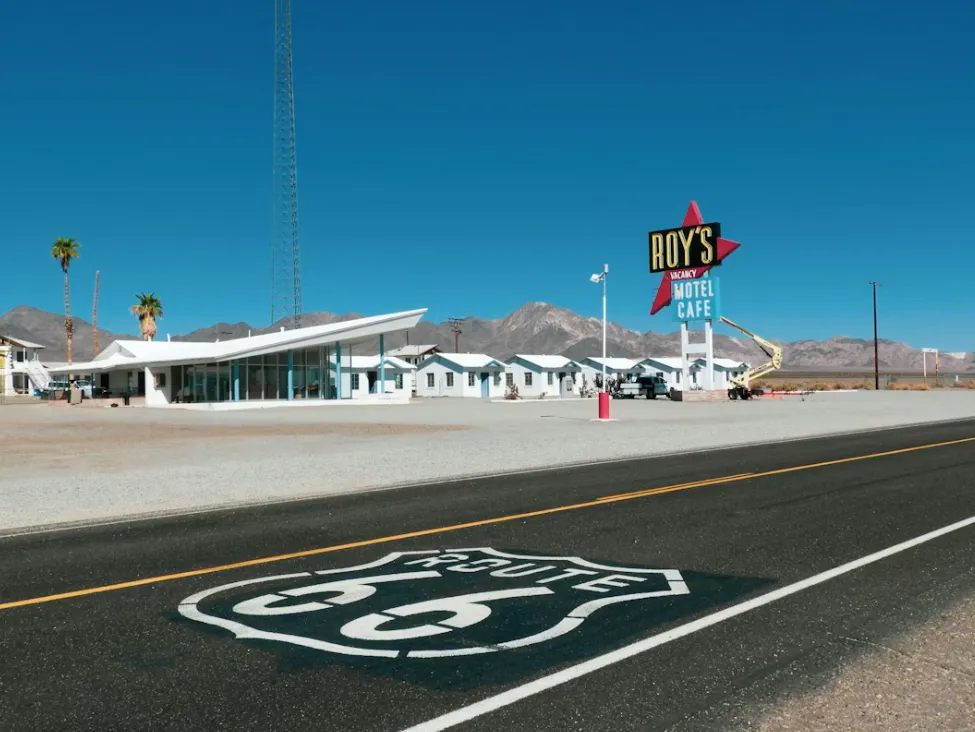
Crossing state lines and traversing the vast American highway system requires more than just a GPS; it requires strategic planning for fuel stops and a sense of adventure for the path less traveled. From saving cents at the pump to discovering quirky roadside attractions, these apps are designed to turn a grueling long-distance haul into an unforgettable cross-country journey.
GasBuddy — Save on Every Gallon
[Download @ Google Play] [Download @ App Store]
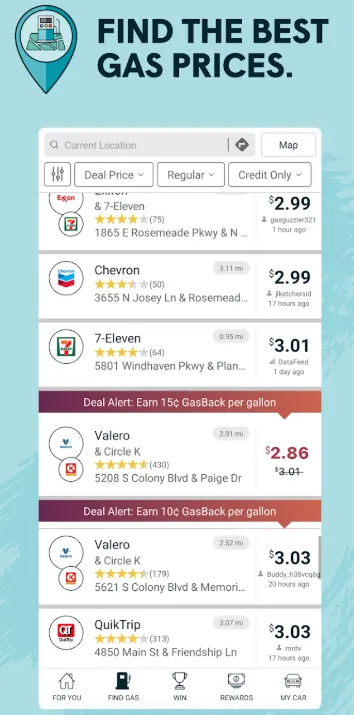
GasBuddy uses a massive community of users to track gas prices at nearly every station in the U.S., helping you find the cheapest fuel nearby.
-
Scenario: You’re low on fuel on a highway in Georgia. GasBuddy tells you that the station 2 miles ahead is 30 cents cheaper than the one at this exit.
-
works exceptionally well for: High-mileage travelers looking to cut fuel costs.
-
Pros: Massive price database; "Pay with GasBuddy" card offers extra discounts; includes a fuel log.
-
Cons: App is quite heavy with ads; interface can be a bit clunky.
-
Best for: Budget-conscious road trippers and long-haul drivers.
PlugShare — For the EV Crowd
[Download @ Google Play] [Download @ App Store]
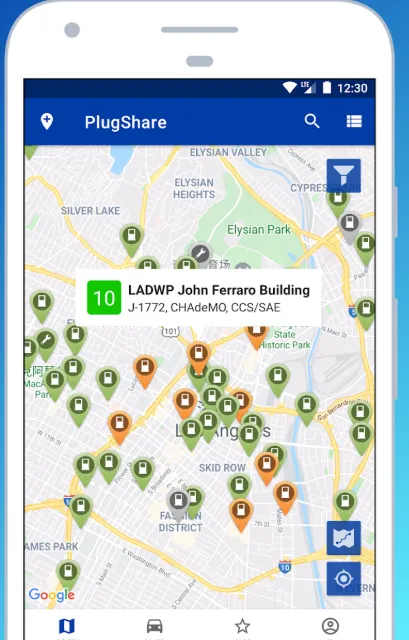
A vital tool for electric vehicle (EV) drivers, PlugShare provides a map of all public and private charging stations across North America.
-
The Vibe: The "GasBuddy" for electric cars.
-
Scenario: You’re taking your Tesla or Rivian on a road trip. PlugShare shows you "hidden" chargers at hotels or restaurants that aren't on the official maps.
-
works exceptionally well for: "Range anxiety" relief by showing real-time charger availability and user-uploaded photos.
-
Pros: Includes all networks (Tesla, Electrify America, ChargePoint); detailed user reviews on charger reliability.
-
Cons: Data is crowdsourced, so occasionally a station marked "available" might be broken.
-
Best for: Any EV driver traveling beyond their home charging range.
Roadtrippers — Find the "Hidden Gems"
[Download @ Google Play] [Download @ App Store]
Roadtrippers is a travel planning app that focuses on the journey, helping you discover unique roadside attractions and scenic detours.
-
Scenario: You're driving from Nashville to New Orleans. This app suggests the "World's Largest Rocking Chair" or a hidden roadside BBQ shack you would have otherwise missed.
-
works exceptionally well for: Planning long-distance itineraries with interesting stops every few hours.
-
Pros: Beautiful interface; easy "waypoint" addition; syncs across web and mobile.
-
Cons: Premium version required for longer trips with many stops.
-
Best for: Adventurous travelers and families on vacation.
Pro-Tips for an Epic American Road Trip
-
Download Offline Maps: U.S. National Parks and rural stretches of the Midwest often have zero cell service. Always download your route on Google Maps for offline use before leaving your hotel.
-
Check "Rest Area" Locations: On long highway stretches (like I-10 or I-80), rest areas can be 50+ miles apart. Use your navigation app to scout for "Rest Areas" or "Welcome Centers" to avoid being caught off-guard.
-
Carry a Physical Emergency Card: While apps are great, keep a printed list of emergency numbers and your insurance info in the glovebox. Phones die, and chargers break.
-
Mind the State Lines: Traffic laws (especially speed limits and right-on-red rules) can change slightly between states. Keep an eye on physical signs when crossing borders!
Best Intercity Bus and Train Apps
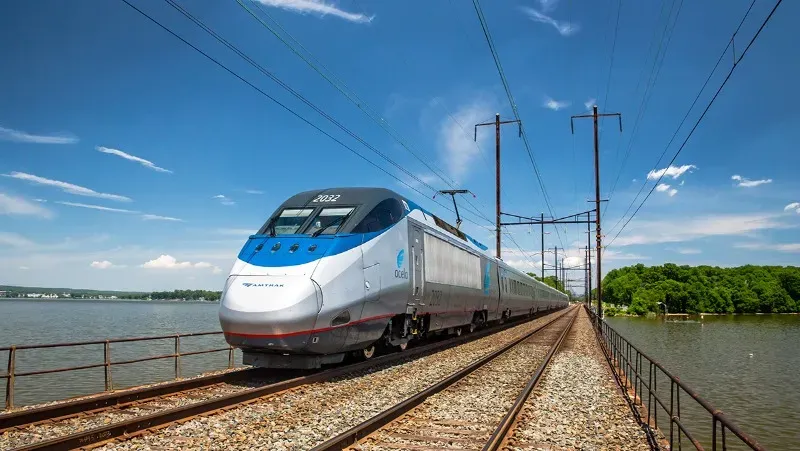
For those who want to skip the stress of driving or the hassle of airports, the U.S. offers a robust network of intercity bus and rail services. Whether you’re commuting along the bustling Northeast Corridor or embarking on a budget-friendly cross-country trip, these apps help you compare fares, book tickets, and track your journey in real-time.
Amtrak — The Classic Rail Experience
[Download @ Google Play] [Download @ App Store]
The Amtrak app is the official portal for the U.S. national passenger rail service, covering regional corridors and cross-country routes.
-
Scenario: You want to see the scenery from NYC to DC without dealing with airport security. The Amtrak app lets you show your QR code to the conductor and track your train’s progress.
-
works exceptionally well for: Northeast Corridor travel (Boston-NYC-DC) and scenic long-haul adventures.
-
Pros: Easy mobile boarding; real-time train tracking; manages rewards points.
-
Cons: Trains outside the Northeast are often subject to long delays.
-
Best for: Travelers who prefer comfort and scenery over the speed of flying.

Wanderu — The Comparison Engine
[Download @ Google Play] [Download @ App Store]
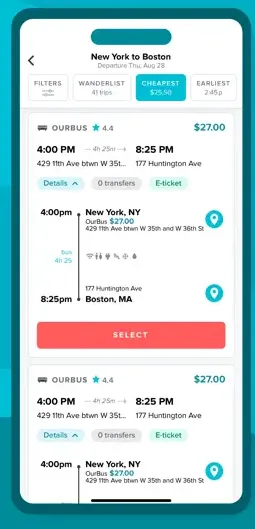
Wanderu is a travel search platform that compares prices for buses and trains across different carriers like Greyhound, FlixBus, Megabus, Peter Pan, and Amtrak.
-
Scenario: You need to get from Boston to New York. Wanderu compares Amtrak, Greyhound, and FlixBus on one screen so you can choose between "Fast & Expensive" or "Slow & Cheap."
-
works exceptionally well for: Finding the absolute lowest price for intercity travel.
-
Pros: Combines multiple carriers into one search; simple booking process; clear baggage policy info.
-
Cons: Booking fees can occasionally be higher than booking directly with the carrier.
-
Best for: Students and budget travelers moving between major U.S. cities.
Major Bus Carriers to Know
While apps help you book, knowing the main players in the American bus market is essential for setting expectations:
-
Greyhound: The iconic, most extensive bus network in the US. It reaches almost every major city and many small towns.
-
FlixBus: A modern, tech-focused carrier that has acquired Greyhound but operates with its own distinct branding on many routes. Known for better app integration and Wi-Fi.
-
Megabus: Famous for its double-decker buses and promotional $1 fares (if you book very early). Primarily operates in the Northeast and South.
Pro-Tips for Intercity Travel
-
Book "Quiet Car" Tickets: If you’re using Amtrak and need to work or sleep, check if your train has a "Quiet Car." It's a sanctuary where phone calls and loud conversations are prohibited.
-
Arrive Early for Buses: Unlike trains with assigned seats, many budget buses (like Greyhound) are first-come, first-served for seating. Arrive at least 30 minutes early to snag a window seat or a spot with a working power outlet.
-
Check Station Locations: Some budget bus "stations" are just street corners or parking lots rather than actual buildings. Always use the app to check the exact "pick-up point" map to avoid wandering around a city block.
-
Keep IDs Ready: Always have a physical government-issued ID (passport or driver's license) accessible. Conductors and bus drivers frequently check IDs against mobile tickets.
Best Micro-Mobility: Scooters and Bikes
For short urban distances that are too far to walk but too close for a car, micro-mobility has revolutionized American city travel. These apps allow you to locate, unlock, and ride electric scooters and bikes parked right on the sidewalk. Perfect for "last-mile" connections or simply exploring a downtown district, these tools offer a fast, eco-friendly, and often exhilarating way to navigate the grid.
Lime & Bird
[Download Lime @ Google Play] [Download Lime @ App Store] [Download Bird @ Google Play] [Download Bird @ App Store]
These apps control networks of dockless electric scooters and bikes that can be rented by the minute using your phone.
-
Scenario: Your destination is 15 minutes away by foot in the Austin heat. You grab a Lime scooter on the corner and zip there in 4 minutes.
-
works exceptionally well for: Solving the "last mile" problem—getting from a train station to your final office/hotel destination.
-
Pros: Wide availability in major cities; easy "scan-to-ride" tech; fast and fun.
-
Cons: Can be expensive for longer rides; safety and helmet laws vary by city.
-
Best for: Young professionals and tourists in flat, scooter-friendly cities.
City Bike Systems (Citi Bike, Divvy, etc.)
These are city-partnered, docked bike-sharing systems found in major hubs like NYC (Citi Bike), Chicago (Divvy), and SF (Bay Wheels).
-
Scenario: You’re a local in Chicago. You use the Divvy app to unlock a blue bike for your morning commute—it’s cheaper than a Lyft and faster than the bus.
-
works exceptionally well for: Reliable, low-cost commuting for locals who have a membership.
-
Pros: High-quality bikes (including e-bikes); fixed docking stations mean bikes are easy to find; cheaper than scooters for longer trips.
-
Cons: Requires finding a dock to finish your ride; docks in popular areas can be full during rush hour.
-
Best for: Residents and frequent visitors to major urban centers.
Recommended App Kits by Traveler Type
To make your US journey seamless, we have curated specific "digital toolkits" tailored to different travel styles. Instead of cluttering your phone, focus on these essential combinations.
1. The Short-Term Tourist: "Exploration & Reliability"
-
Google Maps: Your primary compass for everything from walking to bus schedules.
-
Uber: The fallback for late nights or when you’re carrying shopping bags.
-
Transit App: Essential if you plan to use local buses/trains; its "GO" mode is a lifesaver for tourists.
-
SpotHero: If you've rented a car, use this to avoid the "where do I park" panic near tourist landmarks.
-
Why this works: These apps require minimal setup and offer the most consistent experience across multiple US cities.
2. The International Student: "Budget & Survival"
-
Transit App + Official City App: Use Transit for navigation and the official city app (like Ventra or Clipper) for student-discounted monthly passes.
-
Lyft: Usually offers better student discounts and "Wait & Save" options to keep costs down.
-
Wanderu: Your ticket home or to a nearby city for the weekend; compares the cheapest bus and train fares.
-
Lime/Bird: For those 10-minute trips between campus buildings or to the grocery store.
-
Why this works: It prioritizes cost-savings and "last-mile" connectivity, essential for those living without a car on a budget.
3. The Cross-Country Road Tripper: "Highway Mastery"
-
Waze: Essential for avoiding speed traps, road debris, and long-haul highway congestion.
-
GasBuddy: Saves you hundreds of dollars on a multi-state trip by finding the cheapest fuel off the highway.
-
Roadtrippers: Transforms a boring drive into an adventure by highlighting quirky sights (like the "World's Largest Ball of Twine").
-
ParkMobile: For when you finally reach a city and need to pay for street parking without carrying quarters.
-
Why this works: It balances safety/efficiency (Waze) with cost-efficiency (GasBuddy) and the spirit of discovery (Roadtrippers).
4. The Mega-City Local (NYC, Chicago, SF): "Precision Timing"
-
Citymapper: Provides the level of detail needed for complex subway transfers (e.g., "board the middle carriage").
-
Curb/Arro: Allows you to hail a yellow taxi when Uber/Lyft surge pricing becomes unaffordable during rush hour.
-
PlugShare: If you’re a city driver with an EV, this is the only way to find available chargers in dense urban garages.
-
Citizen (Bonus): Not strictly transportation, but many locals use this to track safety incidents/delays that might impact their commute route.
-
Why this works: In Tier-1 cities, the "shortest" route on paper is rarely the fastest; these apps provide the high-granularity data needed to navigate the urban maze.
Final Tips for US Travel
Mastering transportation in the U.S. goes beyond just knowing the right apps; it's about understanding the unique logistics, safety features, and local habits that define American travel.
1. Navigating Surge Pricing and Peak Hours
-
The "20-Minute Rule": During heavy rain, after a major sporting event, or at "Bar Close" (usually 2 AM), rideshare prices can skyrocket (3x-5x the normal rate). If you can, wait 20 minutes in a safe indoor location; prices often normalize as the initial rush of riders clears.
-
Walk a Block: GPS "Hotspots" (like the front entrance of a stadium or airport) often have additional surcharges. Walking just one or two blocks away can sometimes drop the price by $10 or more.
2. Public Transit Limitations in US Cities
-
Safety First: In major cities, be mindful of your surroundings on trains and buses late at night. Many locals switch to rideshare apps like Uber or Lyft after 10 PM for door-to-door safety.
-
The "Ghost Bus" Phenomenon: Occasionally, apps will show a bus is arriving, but it never appears due to driver shortages or technical errors. Always have a "Plan B" (like a nearby subway or a rideshare app open) if you have a strict deadline.
-
Weekend Service Gaps: Many U.S. transit systems significantly reduce frequency on Saturdays and Sundays. Always check the "Weekend Schedule" specifically on your app before heading out.
3. Combining Third-Party Apps with Official Transit Apps
-
Navigation vs. Payment: Use Google Maps or Citymapper to plan the route, but always download the Official City App (e.g., MTA, Ventra, Clipper) to actually pay the fare. Many official apps offer "Fare Capping," where you stop being charged after you reach the price of a daily/weekly pass.
-
Service Alerts: Official apps provide the most accurate "Service Alerts" regarding construction or unexpected line closures that third-party apps might miss.
4. Connectivity and Power Management
-
Download Offline Maps: If you are heading to a National Park (like Grand Canyon or Acadia) or driving through the rural Midwest, you will lose cell service. Download your entire route on Google Maps for offline use while you still have hotel Wi-Fi.
-
The "Two-Battery" Rule: Using GPS, high-brightness screens, and constant cellular data pings will drain your phone fast. Always carry a portable power bank or a car charger—your "Digital Toolkit" is useless if your phone is dead.
-
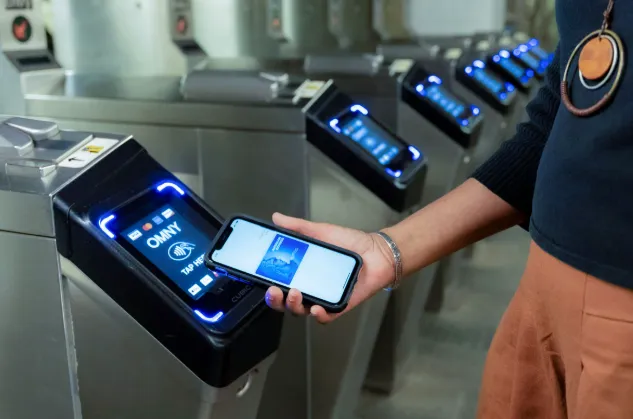
Tap-to-Pay Mobility: Most major cities (NYC, Chicago, SF, DC) now support "Contactless Payment." You can simply tap your credit card or Apple/Google Pay directly on the turnstile without needing to buy a physical ticket.
Conclusion: The "Best" app is the one that fits your style. If you crave efficiency, go for Citymapper and Waze. If you want simplicity, stick with Google Maps. Welcome to the road—stay safe and keep those batteries charged!